
In this issue:
- Find bugs – win prizes
- Next user conference – Save the Date
- New User Level 15
- Import directly into your MSSQL database
- Spotlight on Right Signature integration
- Spotlight on Billing Tree integration
- Seeking betas for Canadian payment processing
- Release News
- User Offer
Find bugs – win prizes
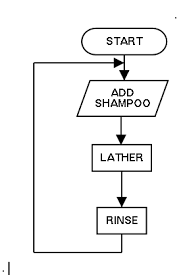
Computers take things literally
Like the programmer who got stuck in the shower because the instructions on the shampoo bottle said: ‘lather, rinse, repeat’, if you find a place where Collect!’s behavior does not match the documentation, and you get the same result at least three times in a row, we want to know about it so we can fix it. And Collect! will be better, which helps everyone. Send your bug report to support@staging.collect.org and include:
- A short description of the problem
- The operating environment it was found in
- How you think the system should behave
- The steps you took resulting in this behavior
If you report what turns out to be a reproduceable bug, we will enter your name in a quarterly draw for a $250 credit which you can apply to your hosting, membership or technical services. First draw will be at the end of Q4 2019.
Next User Conference – Save the Date
See you at Embassy Suites Hotel by the Atlanta airport, June 4-5
Planning has begun for the 2020 Collect! User Conference at the Embassy Suites right by the Atlanta airport June 4 – 5 next year. We will be presenting a range of learning sessions, open forums, one-on-ones, partner information, a fabulous ‘Taste of the South’ dinner and more. Registration and hotel links will be on our home page shortly.
New User Level 15
New Administrator / Client Services user level
A new user level has been created for job titles such as Office Manager, Accounting Manager or Staff & Data Entry. This level is more robust than user levels 20, 80, 85 or 90 and provides more of what is needed for these job titles, and removes what is not needed.
| This user level has the ability to: | This user level does not have the ability to: |
|
|
You have 3 options to add new User Level 15 to your system:
- Do-It-Yourself Option: The Collect! Member Center contains a master version of User Level 15 access rights and an Excel spreadsheet with 660 access rights that need to be manually set. Allow up to 8 hours for this task, and refer to the User Level section in the Help Docs for background information. User levels cannot be imported or copy/pasted in any version lower than Version 12.8 (see the import option below).
- Full-Service Option: Contact support for a technician to add User Level 15 to your system and set the 660 access rights. Allow up to 5 hours for this task at a cost of $600.
- Import Option Available for 12.8 or Higher: The Collect! Member Center contains UserLevel15Query.txt that will allow you to create user level 15 based on version 12.8 access rights structure. If you are not on Collect! Version 12.8 yet, you need to upgrade or update before running this Query.
Technical News
Import data directly into your SQL Server database
For a Collect! user who regularly imports very large data files containing basic data we have built custom executables that allow the data to be imported directly into their SQL Server database, bypassing Collect!’s import module. This method speeds up the import process for simple MSSQL inserts without any recalculations required during the import process. If this would be helpful for you, a custom executable could be built for your specifications of what you want to query, report and/or import into specific Collect! fields.
- It could be scheduled to read/write .csv, .txt and .xlsx
- It could query data from your database and create files or insert records according to the results
- It could be used for scheduled PDF letter/report generation
- It could be used for generating .eml files, and sending emails
- It could initiate procedures or call integrations directly from the database usually initiated by the Collect! Scheduler. For example, the import could trigger a Right Signature document to query results without using the Collect! scheduler
Partner News
Right Signature integration
 “We have been using Right Signature now for 9 years. We are impressed with Right Signature based on price, their extremely user-friendly platform and their supportive service. This is all the better now with the Collect! integration which makes using Right Signature from Collect! fast and easy.” Leon Martin, Allegiance Accounting Service If you are looking for a document signing solution, we suggest you consider Right Signature, a Citrix product.
- You can send documents directly from C! using our integration
- The Right Signature system is easy to use
- All plans allow use of our integration
- Each plan includes a generous number of documents
- Additional documents can be sent for added cost
- Sample pricing: 5 users = $18/month/user and includes 300 docs/month/user
- Pricing: they are willing to discuss pricing especially for multiple users
To set up an account with Right Signature contact John at john.bishop@citrix.com. Once your account is in place contact support@staging.collect.org for the integration. We have also built an integration with Docusign and are seeking more beta sites.
A payment processor designed for collections
 Billing Tree is an industry leader in secure, innovate payment processing solutions for the collections, debt buying and ARM industries. Best of all, our integration lets you process directly within Collect! Find out how Billing Tree’s expertise can improve your processing.
- Secure: Dedicated compliance department ensures PCI, NACHA compliance
- Flexible: Proprietary technology supports credit/debit cards, ACH, IVR, web/online, text payments and even convenience fees
- Supportive: US based industry expert support staff helps you optimize your processes
- Integrated: Collect!’s code based integration with BT uses USAePay and ACHNow gateways, Collect!’s new browser based integration uses BT’s proprietary Payrazr gateway
https://mybillingtree.com/industries/accounts-receivable-management/collection-agencies/
We are seeking betas for a Canadian payment processing gateway
 This fall we will be building an integration with PSiGate, a Canadian payment gateway and are seeking Canadian beta sites. To qualify you must have a physical address in Canada and a Canadian banking relationship. Contact info@staging.collect.org for more information.
Release News
Version 12.8 set for release in September
Collect! Version 12.8 will include optimizations to Importing, Find By, and the WIP list. The new language functions will enable the translation of pop-ups and messages on a per-operator basis. The language functions have required complex programming and extensive testing for the addition of UTF8 characters that will allow a range of scripts. If you are interested in upgrading, please email support@staging.collect.org. Note:
- If you are on Collect!’s cloud solution, congratulations, you are on the latest release.
- Updating and testing in your test environment before updating your production environment is always recommended.
- If you are using webhost, and you are running 12.2 or earlier, you will need to update your webhost to the latest version at the same time as you update Collect!.
- You can download the new update here. It takes only a few minutes to download and install.
Collect! User Tip

You can reload your WIP list with new specifications
By default, contacts in a WIP list are loaded with today’s date at the top and then by oldest to newest dates. Contacts with the same date are sorted according to priority, then name, then type. Timed contacts go below normal contacts and are sorted by time. However, you can click the Reload button in the Work in Progress form to load contacts for a specific client, date range, or operator. For more information see the Help document titled Reload Work In Progress List or How To Use The WIP List.