
In this issue:
- June 8 virtual user conference program
- Major outgoing email enhancement
- Major incoming email enhancement
- Comtech Member Center Portal now shows billing history
- New Client Portal ready for beta
- User Tip: Pre-Set management reports in Report Generator
- Release news
June 8 virtual user conference program

Program available online
Click on the link below for a detailed conference program. Topics include What’s New, Customer Portal Demo, CBR Changes, Report Generator Enhancements, Consumer Portal Demo, Bulk Importing Tips and Tricks from Down Under and of course, another of our popular Open Forum Sessions.
- Program link
- Registration link
- Free for cloud subscribers and members
- $99 for non-members
- Sessions recorded for later viewing
- Sessions slides available for download
- Register as many people from your company as you like
Major outgoing email enhancement

Use SQL Server for emailing from Collect! instead of HMail
Collect! can now make use of SQL server for email. This eliminates the use of HMail for emailing directly from Collect!, eliminates dependency on Outlook, and eliminates the need for all emails to originate from the same domain.
This easier new emailing functionality is operator specific, so each operator needs to create their own emailing profile. Best of all, this system allows emailing from multiple domains.
This system is not compatible for Collect! clients making use of SQL Server Express because it uses optional SQL Server features not available in SQL Server Express. Anyone on SQL Server Standard or Enterprise can easily switch to this improved email functionality.
Details will be available in a Help Document when Collect! Version 13.6 is released.
Major incoming email enhancement

Have emails land directly in Collect! instead of in an email client outside Collect!
Collect! has built an enhancement in beta that allows emails to be deposited directly into Collect! rather than in an outside email client. By default, Collect! uses the sender’s email address to link the email to the correct account, but the system could be configured to search the subject line for an identifier such as “Ref:{filenumber}”. Emails are stored in debtor accounts as contact with the type of Email In. This enhancement enables consumer emails to be added to account information with no operator intervention. The email (EML) file is added to the Contact’s Attachment field to be opened with your default email application.
At this point we are seeking cloud sites who would like to make use of this enhancement. Once this enhancement is past beta, it will be available for general release.
If you like this feature, and are a cloud site, please contact support@staging.collect.org.
Comtech Member Center Portal now shows billing history

Your invoice & payment history available online
The self-serve Customer Portal available to you in the Collect! Member Center now includes your complete invoice and payment history. Instead of calling the office with inquiries, historic and current invoice and payment information is now available to you 24/7. Future billing enhancements will enable you to update the payment information on file.
Account management functions of the Customer Portal include:
- Change Passwords
- Edit Company Details
- Edit or change Primary Contact
- Edit, remove and add Authorized Users
- View your License Details
- View your Membership Status
- View your payment schedule and account balance
- See your invoice and payment history
New Client Portal ready for beta
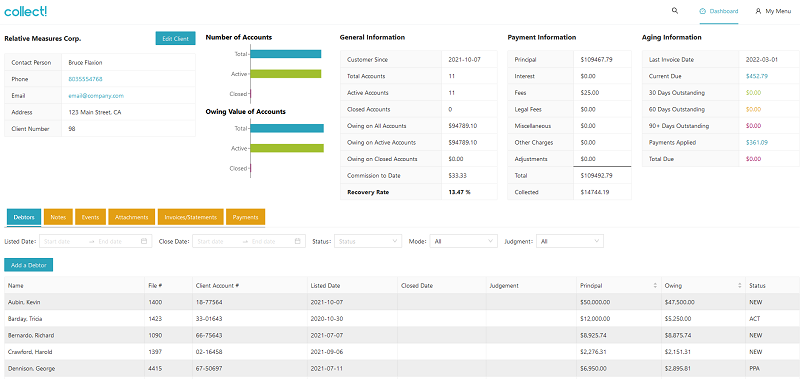
Cloud sites invited for beta
The new Collect! Client Portal replaces the legacy Web Host system. The new portal will eventually have all the same features and more, but built on a newer, stronger, more flexible platform that enables further development. Features are being added as we go.
We are seeking cloud users without any Web Host customizations as beta sites. If you would like to make early use of these enhanced functionalities email contact support@staging.collect.org.
Please Note: Due to the new architecture, customizations will not be supported. If you would like to build your own client portal, our API documentation is available here: How To Use The Rest API
User Tip
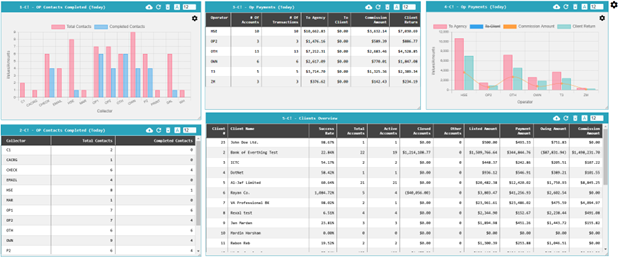
Pre-Set management reports in Report Generator
Collect!’s Report Generator Utility enables you to select data, and apply filters and sorting criteria to produce custom reports in Collect! outside of Collect!’s more complex Report Writer Engine. The Report Generator offers a range of output formats including HTML, printer, files, emails and reports. Reports can be generated in table or graph formats; many output formats can be stored for repeated use.
The Report Generator now also includes a set of pre-set management reports including Operator Contacts Completed, Operator Payments, Operator Contacts, Clients Overview. You have the capacity to change the layout of these existing reports to customize them for your unique purposes.
The Report Generator is a Collect! web-based utility accessible from the Collect! Web Host Remote Access System. These reports are automatically created when you upgrade to our latest version of Web Host. If you updated your Web Host version in the last year, you probably already have these reports in your system. To make use of the Report Generator, set up Web Host in your system.
Release News
Maintenance Releases
We periodically put out maintenance releases to address reported issues.
For more information, please visit the Version 13 Revision History page here.
For more information, please visit the New Features page here.
If you are interested in upgrading, please email support@staging.collect.org.
Note:
- If you are on Collect!’s cloud solution, congratulations, you are on the latest release and will be automatically as new releases come out.
- Updating and testing in your test environment before updating your production environment is always recommended.
- If you are using Web Host, and you are running 12.2 or earlier, you will need to update your Web Host to the latest version at the same time as you update Collect!.
- You can download the new update here. It takes only a few minutes to download and install.