
In this issue:
- User Conference program
- Support issue intake
- Consumer Portal Version 1
- Partner updates
- User Tip – Legal Entity Commercial will now be included in CBR, regardless
- User Tip – Payment Processing module updates final amount if owing less than payment
- Release news
User Conference program

Calling all users
The virtual user conference program is now available online and features:
- 2 learning tracks
- 8 Collect! presentations and demonstrations
- 2 Collect! open forum sessions with 2 staff teams
- 10 Partner education and Q&A sessions
- 3 fabulous prizes for the most engaged participants
Cost: Free to cloud users & members, $99 per non-member company
Participation: Unlimited per company
Registration: You will need your Collect! client # to register individuals
at this link
User Conference Partners:
Support issue intake
Introducing Intake Technicians
We all want your questions and issues to be resolved with accuracy, speed, and efficiency. To get your support issue onto the desk of the most appropriate technician as fast as possible, we now have designated technicians to take incoming calls, collect the information on your issue, and create a ticket for triage.
To speed the process up and get your ticket in sooner, you can create your own ticket with as much detail as possible. Include screenshots, if possible. Tickets can be created via the Member Center or by emailing support@staging.collect.org from a registered email address.
Tips for creating a ticket:
- Submit via Member Center or email Support from a registered email
- Phone if you want us to create the ticket and put you in the queue
- Write an informative subject line. Please do not put your company name in the subject. Your email is already linked to your company profile.
- Provide clear details in the body: who, what, where, when
- Bullet points are better than paragraphs
- Add screenshots and other documents
- For custom work, include samples
- Identify department (Support, Custom Services, or Australasia), category, and priority
- Create separate tickets for separate issues
- After a ticket has been created, you can add additional recipients via the Member Center, if needed
- If you need to send us credentials for servers, please use the Credentials button on tickets in the Member Center
Support emails sent to personal emails will not be responded to.
If you need to add a user to be able to contact Support, please have any Primary Contact on your account sign in to the Member Center and add them.
Consumer Portal Version 1
Betas wanted now, general availability expected in Q3
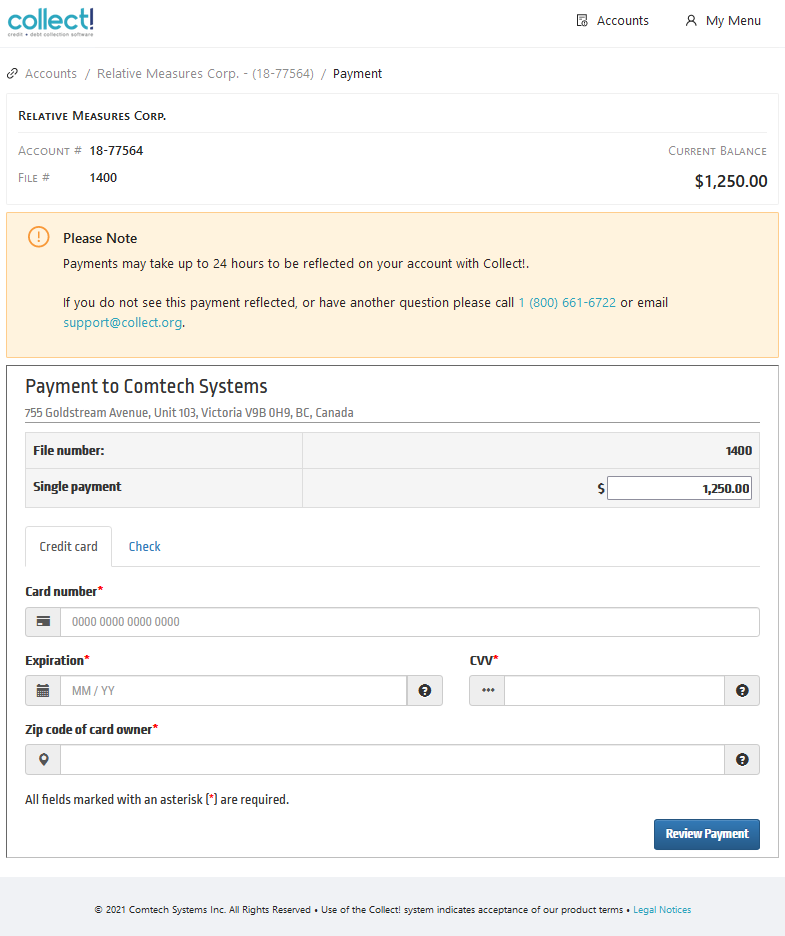
Development of Version 1 of the Collect! consumer portal is on schedule. Version 1 will enable consumers to opt-in to the range of communications channels you offer, view their current balance, view past payments, and make a payment. Version 2 and on will continue to add features to this initial functionality. The portal will be hosted on your website and can be branded with your company logo and colors.
- If you are interested in being a beta in Q2, please email info@staging.collect.org
- Plan to join the Consumer Portal Version 1 Demo user conference session on Friday, June 3 at 9:30 AM PST / 12:30 PM EST
- Below is a sample screen shot from the portal
Partner updates
Billing Tree introduces new version of Merchant Pass

BillingTree is excited to introduce a new version of Merchant Pass. Merchant Pass is a revolutionary way to process payments where the cardholder pays the cost associated with processing the payment. In this latest version, the cardholder’s flat fee is tiered based on the transaction amount, and the merchant benefits by receiving 100%% of the transaction amount with no processing fees.
Seeking beta sites for Payment Vision integration

The Payment Vision integration is now in beta and ready for implementation in users’ systems. You will work directly with our implementation developer to speed up your workflow.
Also seeking beta sites for Repay integration

The Repay integration is currently being built and we will soon be ready for implementation in users’ systems. Unlike most other payment processor, Repay functions in both US and Canada for cards and ACH (US) or EFT (Canada). The integration for the US is currently underway, to be followed by the integration for Canada.
Solutions by Text User Comment

Here is a comment on how a Collect! user is benefitting from Solutions by Text’s highly compliant and adaptable texting platform.
“Integrating SMS-text with Solutions by Text into our Collect! platform, including powerful text message templates and ‘freehand messaging’, noticeably improves our file flow and contact rates with debtors, leading to more dollars collected for our clients!”
Chris Dugan, Case Receivable Management
User Tips
Legal Entity = Commercial will be included in CBR, regardless
Debtors with Commercial set in the Legal Entity field on the main debtor screen along with that Debtor’s Cosigners, will now always be included in the Credit Bureau Reporting Metro2 file, regardless of Validation Letter settings on the CBR Setup. The Legal Entity field is located directly to the right of the Name field on the debtor window.
Update to Credit Card Integrated Payment Processors: Automatically update payment plan if owing if less than payment amount
We have updated the Credit Card Payment Processing to update the recurring payment plan on the gateway if the owing is less than the payment amount, regardless of number of remaining payments. Before this change, the gateway would only be updated if the number of remaining payments was 1.
During the reconciliation process, Collect! does the following:
- Posts the payment received from the gateway
- Recalculates the account
- Compares the new debtor owing to the gateway payment amount
- If the owing ever gets below the payment amount, Collect! updates the gateway with the owing amount and sets the number of remaining payments to 1
NOTE: Collect! will never adjust the payment up, so if the owing is $105 and the payment amount is $100, the next payment will still be $100. If the owing is $95, then the last payment will become $95.
Release News
13.3 released
- Added alphnumeric invoice and receipt numbers to transactions.
- Added 3 more File fields to attachments.
- Added Dialer ID to the Contact record to store a campaign ID to prevent the same call result from being imported twice.
- Added a Create Phone Contact option to the Autodialer Preferences which, when enabled, will create a Phone contact with the number that was dialed in the description field. If an existing, in progress, Phone contact with the same number exists, the system will do nothing.
- When creating Phone Contacts, instead of displaying a static pick list with Home, Cell, etc., Collect! will now display a dynamic pick list with the active phone numbers from the Phone tab. The database will store the phone number, without any special characters, in the Contact’s Description field.
- Added new contact types for incoming Phone, Email, Letter, and Text communication.
- Files generated by the @PDF and @TXT commands will now be copied to the applicable Client or Debtor attachment folder from the letters folder.
- Debtors with Commercial in the Legal Entity field, and the Debtor’s Cosigners, will now always be included in the Credit Bureau Reporting Metro2 file, regardless of Validation Letter settings on the CBR Setup.
- Updated the Credit Card module to update the payment plan on the gateway if owing is less than the payment amount, regardless of number of remaining payments. Before this change, the gateway would only be updated if the number of remaining payments was 1.
For more information, please visit the New Features Page here.
If you are interested in upgrading, please email support@staging.collect.org.
Note:
- If you are on Collect!’s cloud solution, congratulations, you are on the latest release and will be upgraded automatically as new releases come out.
- Updating and testing in your test environment before updating your production environment is always recommended.
- If you are using Web Host, and you are running 12.2 or earlier, you will need to update your Web Host to the latest version at the same time as you update Collect!.
- You can download the new update here. It takes only a few minutes to download and install.