
In this issue:
- User conference special guests
- User conference program
- Faster way to import large files
- User conference partners
- Payment Vision automations
- Update on Version 12.9
- Collect! Facebook posts
- User tip
June User Conference
User conference special guests
We are pleased to announce the participation of two outside experts:
- Leah Dempsey, VP and Senior Counsel for Federal Advocacy for the Association of Credit and Collection Professionals ACA), our industry’s leading organization, will speak on CFPB rule changes and other collection rule changes and be available for questions
- David Rittelmeyer, Manager of US Consumer Data Operations for Equifax, one of the ‘big 3’ bureaus, will speak on data furnishing and be available for questions
User conference program summary
We have created 2 learning streams:
Stream 1: Collect! Training Stream Sessions
- What’s on the Collect! Horizon?
- What’s New since last we met?
- Innovate to Automate: Develop your personal ‘operational efficiency radar’
- Make Reports and Letters Work for You: Use filters, scripts and popups to save time
- Elevate Your Support Experience: Getting the most from Collect! technical support
- Credit Bureau Reporting 2.0: Participate in this ‘Next Gen Think Tank Session’
- Proven Methodologies for Using Collect!: Everything you should be doing, but maybe aren’t
- Hiding in Plain Sight: All the ways you can make Collect! your bespoke collection software
- Plus 4 Open Forum sessions, and ongoing One-on-One opportunities with Collect! staff
Stream 2: Industry Education Stream Sessions
- Questions to Ask Your Processor: Understand how your payment processor can improve your results
- Beyond Voice: What Portals and Omnichannel Mean for You: Improve recovery with cross-channel communication
- Moving Your Productivity Needle: Leverage workflow and automation engines
- Make the Most of Your Role as Data Furnisher: Tips and insights for furnishing data to the bureaus
- News and Insights into Expected CFPB Rule Changes: How expected CFPB rule changes and other collection rules impact you
- Communicate with Confidence: Compliant omnichannel communication
- Data Strategies to Improve Collection Outcomes: How to benefit from predictive analytics
- PLUS 12 Partner Presentations/Demos & Expo Area
Also: One-on-Ones with Collect! Staff
And: Lunch, Happy Hour, Dinner Networking
The first participant from your company is free. Hosted at the Atlanta Airport Embassy Suites June 4-5. We strongly recommend that you consider bringing more than one person from your company to take advantage of concurrent sessions. If we reach our participation target, Tommy Heart will also participate.
Click Here for:
- Program: Hover your cursor over the session title for session details to pop up
- Conference Registration
- Hotel link: Book online or by phone for the special conference rate
Custom Services

Faster way to import large files
“Several large clients who regularly import large sets of new business on a daily basis wanted a way to import data faster than the Collect! import module. We worked with some programmers at Collect! to build custom scripts that now bulk insert the data directly into their databases in a fraction of the time. Tens of thousands of records are loaded within a few seconds. This was achieved without losing the functionality of the Collect! import module and helped the clients free up resources assigned to importing new data. The scripting also allowed some additional automation in addition to the data import. While it took some experimentation, due the complex nature of the data itself, this has been a very satisfactory solution and overcame a major pain point for them.”
John Ellwood, Collect! Senior Australian Agent
Several Collect! users have sped up their imports of very large files of new business (over 500,000 records per import) by having custom SQL scripts built that import the data files directly into their Collect! database, thereby bypassing the Collect! import module. While the Collect! Import Module offers a lot of actions as part of the import process, this comes at the cost of speed. This does not matter for normal sized files, but slows very large file imports. Importing very large files directly into the database speeds up the import process, and the SQL scripting still allows some additional functionality to be programmed into the import process.
If you have large imports that could be speeded up with a custom SQL script contact support@staging.collect.org.
Partner News
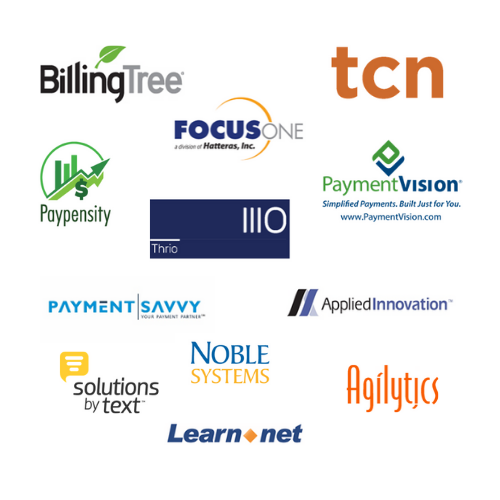
Who can you interact with at the User Conference?
Use the opportunity of rubbing shoulders with these major Collect! Partners to learn more about services that can save you time and improve your collection outcomes.
Automating File Exchanges with Payment Vision

In the last month we have worked with some Payment Vision users to build custom files to upload data from Collect! to Payment Vision, then download the resulting payment files back into Collect! using automations and scripting to replace manual processes. If you are use Payment Vision and are interested in adding automations to this part of your workflow contact support@staging.collect.org.
User Tip
Follow Collect! on Facebook for ongoing refreshers
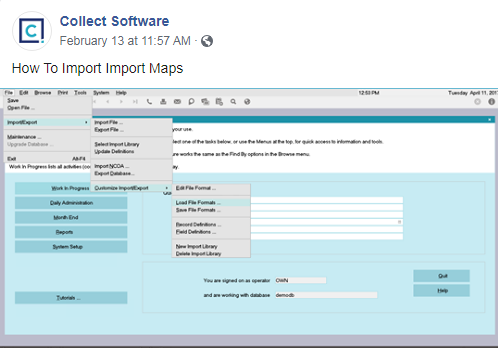
Would you like an easy way to be regularly reminded of options in Collect!? Follow us on Facebook to receive regular updates from our How-To section of the Collect! Help. These posts can remind you of a functionality you may have forgotten about, or show the route to commands that will speed up your practice. For example, this post is titled ‘How to Import Import Maps’ and shows the route leading to the command to ‘Load File Formats.’
https://www.facebook.com/collectsoftware/
Make your data imports do additional work for you
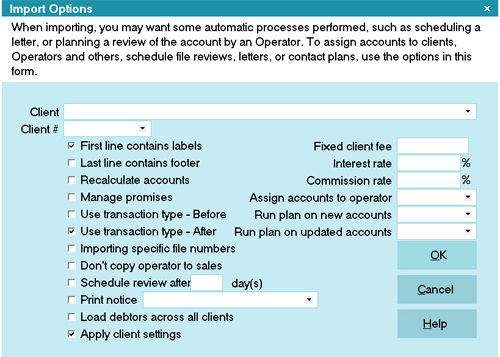
When you import new data into Collect! you can attach incoming accounts to a specific client, assign a fixed fee and other attributes to files as they are loaded, assign accounts to an operator, set a run plan on new accounts, and set a different run plan on accounts that are being modified. The import module provides many possibilities for automatically processing imported data.
http://staging.collect.org/cv12/Help/importmenu.html
http://staging.collect.org/cv12/Help/importoptions.html
New Features
What to expect from Version 12.9
Most of the programming work for 12.9, the next minor release, is done and now in testing. The focus feature of 12.9 will be multi-factor authentication (MFA), both in the basic application and, more significantly, in Web Host. MFA options will include email and QR code options.
- Multi-Factor Authentication
- QR Codes in the Report Writer
- Improved support for International Languages
- Batch Processing to Reset Interest
- Change the Email Receipient and Reply Address in Email Reports
- Enhancements to the Phone Record
For more information, please visit the New Features Page here.
If you are interested in upgrading, please email support@staging.collect.org.
Note:
- If you are on Collect!’s cloud solution, congratulations, you are on the latest release.
- Updating and testing in your test environment before updating your production environment is always recommended.
- If you are using webhost, and you are running 12.2 or earlier, you will need to update your webhost to the latest version at the same time as you update Collect!.
- You can download the new update here. It takes only a few minutes to download and install.