
In this issue:
- New Pay-As-You-Go Short Code Texting Program
- Client Portal UI Enhancements
- New Import Success Report
- Variable Added to Interest Report
- Review Collect!, Get a Gift Card
- User Tips: Control Fields’ Background Color
- Release news
New Pay-As-You-Go Short Code Texting Program
Important short-code texting program change coming February 1
The Short Code Texting Program powered by Solutions by Text has been simplified.
Instead of having to commit to an annual package, you can now sign up for the Collect!
short-code texting program and text as much or as little as you want on a simple
pay-as-you-go basis.
Retired Program:
The retired program required you to commit to an
annual package, it was possible to pay for unused units, and it was possible to incur
overage charges. The new program avoids these negatives.
New Program:
Effective February 1, the program will change to a
simple pay-as-you-go plan that gives you the lowest unit price offered by the retired
program, with no volume commitment or limitation. This gives you use of the Collect!
short code, use of the Collect!-Solutions by Text integration, use of the Solutions
by Text platform and Collect! integration support.
- You will not pay for units that you do not use
- You do not run the risk of overage fees
- There is a monthly $25 maintenance fee
- There is a one time $100 setup fee for new users
- You will pay 0.06/unit regardless of your consumption
- This program does not require annual renewal
- Provide at least 30 days notice for cancellation
NOTE: The above applies to each individual Business Brand Name.
Short code texting provides high compliance and deliverability to 3rd party collectors
in the US. The Collect! integration provides you with editable templates in English and
Spanish, and adds texting workflows to your Collect! system. To protect the program,
texts can only be sent via templates – free form texting is not enabled.
Consumption is measured in units, not in texts. Units are consumed by number lookups,
outbound texts, inbound texts and texts that exceed the 160-character limit. For
example, a number lookup consumes 1 unit, a text up to 160 characters consumes
1.25 units, and a text over 160 characters consumes 2.5 units.
The Collect! integration also supports Solutions by Text FinText Payments https://solutionsbytext.com/text-pay/.
FinText Payments is an add-on payment option provided by Solutions by Text that will
require underwriting and an account with Solutions by Text.
For more detail Click
Here and scroll down to Short Code Texting. If you are not a US 3rd party collector
you are probably eligible for the Long Code Texting Program.
Client Portal UI Enhancements
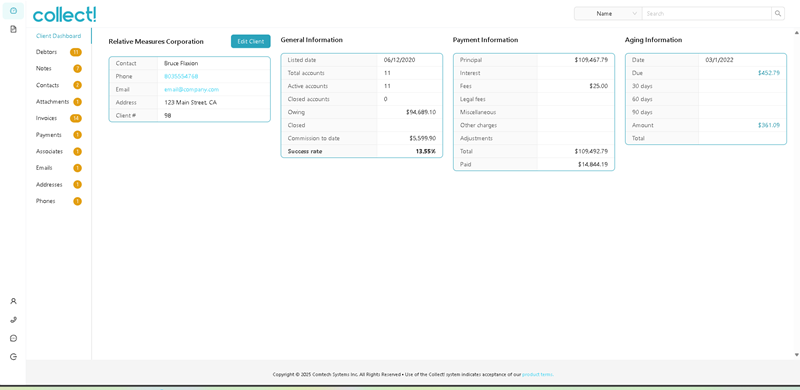
Modern look, intuitive navigation
The client portal UI was recently enhanced with a sleek, modern look with 2 navigation
layers to the left of the primary screen. The client portal is branded with your logo
and colors, and will be configured for your requirements.
If you are already using the client portal, your system will automatically be updated
to the latest version when our UI testing is complete.
If you are not using the client portal yet, click this Client Portal Demo link to see how
this portal adds efficiency for you and your clients:
- View reports
- Upload files (for you to import)
- View and edit account details
- View and edit account notes
- Add accounts with notes, cosigners and attachments
The client portal is included for hosted sites and a one-time charge for premise sites.
Open a support ticket to have the client portal added to your Collect! system.
New Import Success Report
Download from Member Center
New in the Collect! Member Center / Report Templates/ Misc / Import
and Error Status from Application Log
This report creates a schedulable daily report to summarize imports that were completed/not
completed within a configurable time period. If you run the report via the Scheduler,
it will report on the previous day; if you run the report manually it will prompt for
date range.
Variable Added to Interest Report
Download from Member Center
New in the Collect! Member Center / Report Templates/ Debtor / Interest
Statement – HTML / CSV / Email
The Interest Reports available in the Member Center now includes simple interest, compound
interest and variable interest. Download the updated report from the Member Center to
your system. This report replaces the previous report that did not include variable interest.
Review Collect!, Get a Gift Card

Write a SOURCEFORGE review and get a $20 gift card when
it gets published.
- Include details about your experience with the product and support
- Provide some information about yourself so SOURCEFORGE can verify the validity of your review
- The review will only show your first name, last name initial, and job title in the review so you remain anonymous
- Writing a review should take no more than about 4 minutes
- Users in US, Canada, Australia, and many other counties are eligible
- Thank you for sharing your experience with Collect!
- Click
this link to complete your review
User Tips
Control Fields’ Background Color: Make important data pop
An easy way to show a change of status of an account, or draw your operators’ attention
to key data is to use your ability to change the background color of Collect! fields.
For example, you may want the Debtor Status to turn bright red if there is a dispute in
place, you may want to alert operators to fields that must be updated, or you may want
the field color to change when certain conditions are met.
There are 3 ways to change a field’s color:
- Statically with Access Rights: How
To Change A Field’s Background Color - Dynamically with Control Files: How
To Use Control Files - Special Case for Picklists: Pick
List Entry
Release News
13.7 in Ongoing Development
We are currently focused on re-writing the Payment Processing module. The new design will
allow for multiple gateways, simpler coding, uniform processing between ACH and cards,
client payment processing, seamless integration with the new portals, and much more.
Enhancements since the last Newsletter:
- The Debtor recalc was optimized to be added to the API and the optimized version was implemented
in the Tools -> Recalculate menu. - Added an option to the Recalculate Totals form called “Recalc all except Controls” which, when
selected, will behave identically as “Recalculate All Debtor Totals” except it will skip the
Contact Controls, which update the “# Attempts” and “# RCP” fields. - Updated @INC and @INCLUDE in the Report Writer to use the Global File Access path, if defined,
instead of the local install path. - Added an option to the Contact form called “Allow Delete on Close” which, when checked, will
ignore the “Do Not Autodelete” box if the mode is being set to closed. - Updated transaction types 398 (add commission to owing) and 399 (collection fee) to use the
Transaction Type configuration, rather than hard-coded configuration. - Archiving and unarchiving accounts will now update Archive Date.
- When unchecking the “Report to Credit Bureau” box on the Client Settings, you are now prompted
with an option to run a query to disable reporting on the Debtors.
For more information, please visit the
Version 13 Revision History page here.
For more information, please visit the New Features page here.
If you are interested in upgrading, please email support@staging.collect.org.
Note:
- If you are on Collect!’s cloud solution, congratulations, you are on the
latest release and will automatically be updated as new releases come out. - Updating and testing in your test environment before updating your
production environment is always recommended. - If you are using Web Host, and you are running 12.2 or earlier, you will
need to update your Web Host to the latest version at the same time as
you update Collect!. - You can download the new
update here.
It takes only a few minutes to download and install.