
In this issue:
- SOC 2 Type II Report Available Now
- Inventory Management Tool Available Soon
- New Client Portal
- Score and Skip Integration Start
- New York State Passes Fair Medical Debt Reporting Act
- Texting Options
- TCN Switching to API Keys
- User Tips: Turning off Credit Bureau Reporting
- Release news
SOC 2 Type 2 Report Available Now
View Controls and Report
Collect! successfully completed a SOC 2 Type II attestation in December 2023. SOC 2 is an auditing procedure devised by the American Institute of Certified Public Accountants to attest to the security of cloud services. The Type II attestation confirms that appropriate system and organizational controls exist and are consistently applied over time.
Collect! clients can access the control set and the SOC 2 Type II report at this link: https://trust.staging.collect.org/
Inventory Management Tool Available Soon
Look for Announcement in an e-blast
Collect! is in the late stages of building an Inventory Management Tool to improve your collection efficiency. We will send a notification via e-blast once the reports are available in the Member Center.
The Inventory Management Tool is a sophisticated report set designed to facilitate the rapid identification of segments within your inventory.
The Inventory Management Tool includes:
- A Heatmap Report with configurable options to gain insights into your inventory, enabling the identification of account segmentation.
- A Distribution Report with customizable criteria, allowing the assignment of specific groups of accounts to operators based on owing and/or score range, as well as states, if required.
- A Workflow Report that automatically transitions accounts from current operators to Tier 2 operators after a specified number of days without payment and promise-to-pay contacts. Additionally, this report enables the movement of accounts from Tier 2 to Tier 3 based on predefined criteria. Note that Tier 2 and Tier 3 can be customized according to your company’s specific workflow requirements.
We will advise via e-blast when this tool is available in the Member Center.
New Client Portal
Like WebHost, but more stable
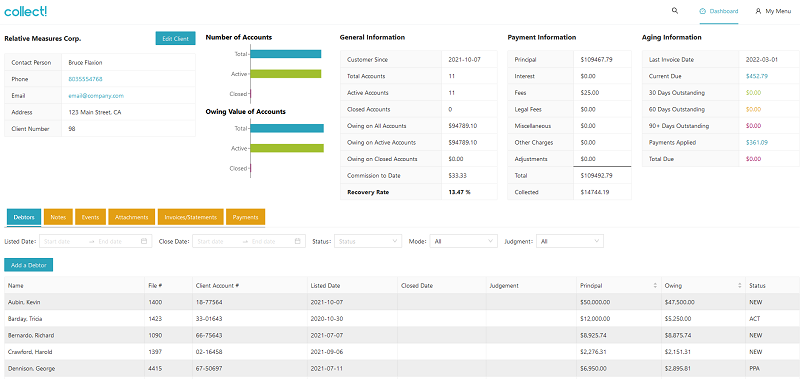
Switch out your legacy WebHost for Collect!’s new Client Portal. The new Client Portal was built to replicate the functionalities of Web Host on a modern, stronger and more flexible platform.
The advantages of the new Client Portal are a cleaner UI and much greater stability.
The caveat is that reporting is still limited in the new Client Portal. Flat output of existing data fields is reliably accomplished, but reports that invoke certain print commands, or report headers and footers, cannot be accomplished in the new Client Portal yet. The reason is that behind the scenes we are undertaking a complete rewrite of Collect!’s Report Engine for Version 14, so not all functions are available to the Client Portal yet. At this time, your clients can enjoy the stability and updated interface of the new Client Portal for standard flat output, but you will need to run the more complex reports in Collect!
Score and Skip Integration Start

Intelitech & Collect! Seek Beta
Collect! and Intelitech are in the early stages of planning an integration that will enable US Collect! users to obtain high quality scores and perform skip tracing directly from Collect!. We are seeking US Collect! users who are interested in facilitating this process by working with us as beta users.
Please reply to this email to indicate your interest.
New York State Passes Fair Medical Debt Reporting Act

Empire State disallows medical debt reporting
New York State signed the Fair Medical Debt Reporting Act on December 13 that prohibits reporting medical debt. Dec 13 announcement about New York State’s Medical Debt Credit Reporting Law. NY’s Fair Medical Debt Reporting Act signed Dec 13. Press Release.
Please contact support@staging.collect.org for a script that will set the Medical Accounts in New York to be deleted.
Texting Options

Collect!’s Long Code Texting Program Powered by Wavix
- Use of a dedicated 10-digit telephone number
- Brand name and campaign registration required for US clients
- One or Two-Way texting options
- Pay-As-You-Go plan with flat rates for lookups and texts
- Texts are sent using your carrier approved template set
- Work through Collect! with no separate texting vendor relationship
- Simple consumption-based program
Collect!’s Short Code Texting Program Powered by Solutions by Text
- Shared use of Collect!’s short code by many Collect! clients
- Configured for standard third-party collection agencies
- Sub-accounts created for each participating business brand name
- No brand name or campaign registration required for any clients
- One or Two-Way texting options
- Packages include certain number of units and flat fee for overages
- Program requires a 1-year commitment
- Units are consumed by number lookups, outbound texts, returned texts
- Texts are sent using your carrier approved template set
- Work through Collect! with no separate texting vendor relationship
- More complex, highly compliant program
For more information click this link and scroll down to the texting programs at the bottom of the page.
TCN is Switching to API Keys
Username and Password being phased out for integration
If you are a TCN Broadcasting customer, you will have received an email from them notifying you of the coming change. This only applies to TCN users.
Previously, TCN used a username and password to connect to their API. In your user list, you likely have a user that is used for the API connections. If you are unsure of which user you are using, you can navigate to the TCN Settings and make note of the user account.
Once you have the correct user account, follow the instructions in the email to generate an API key. Please note that this key appears to expire periodically. Make note of the expiry date and set a calendar reminder to renew the key.
When Collect! Version 13.6.10 is released, the Schedule Call Campaigns and Download Call Reports functionality will still work until TCN disables support for the username and password. In 13.6.10, the API Key field will replace the Username and Password fields on the TCN Settings form. At this time, you can add the API key to continue using the TCN integration uninterrupted.
User Tips
How To Use The Rest API
A REST API is a simple way of interacting with your database. Over time, the Web Host, and XML Data Pump will no longer work as the API will replace them. At present, the API is used for the Dashboard, Client, and Consumer Portals. The API will be the backbone of Version 14. Several of our partners have already started using the API for their integrations instead of flat files.
Collect! Help includes these introductory topics and many deeper topics. Calling up any page will provide a selection of related pages on a navigation pane to the left.
How To Use The Rest API
How To Install The Rest API (for Premise Sites)
Many Training Videos available
Access a wide range of Training Videos in the Member Center/Training Videos. These videos provide overviews and details on the initial setup of many elements of the system and working accounts. You will need a login to access the Member Center.
Release News
13.7 in Development
We are currently focused on re-writing the Payment Processing module. The new design will allow for multiple gateways, simpler coding, uniform processing between ACH and cards, client payment processing, seamless integration with the new portals, and much more.
For more information, please visit the Version 13 Revision History page here.
For more information, please visit the New Features page here.
If you are interested in upgrading, please email support@staging.collect.org.
Note:
- If you are on Collect!’s cloud solution, congratulations, you are on the latest release and will automatically be updated as new releases come out.
- Updating and testing in your test environment before updating your production environment is always recommended.
- If you are using Web Host, and you are running 12.2 or earlier, you will need to update your Web Host to the latest version at the same time as you update Collect!.
- You can download the new update here. It takes only a few minutes to download and install.