
This is the fourth in a series of updates and tips exclusively for the Collect! User Community. In this issue, you’ll hear about new software developments, partner news and tips to help you optimize YOUR use of Collect!
Since this is the last newsletter of 2015 all of us here at Comtech want to wish you, your staff and all your families a wonderful holiday season and the best for 2016.
You may be interested in…
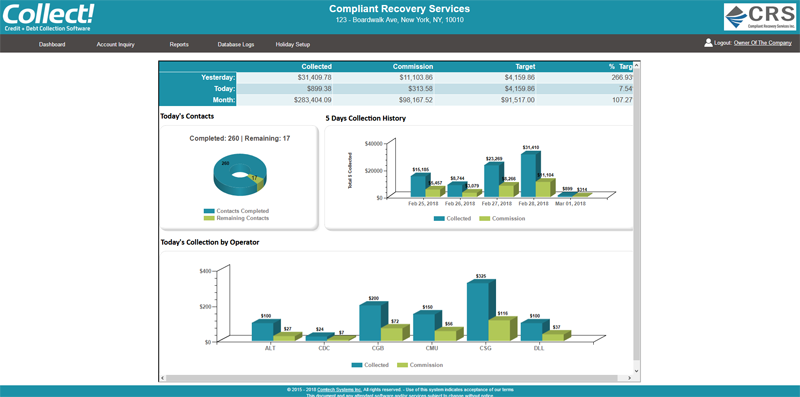
Version 12 Dashboard Sneak Peek
New: Recording option for training
We can now record training sessions for you to access in perpetuity. When you book training on any of Collect!’s functionalities, modules or interfaces, for a small fee we can create an integrated audio/video recording for you to use later as a review or for additional staff. You will get the best use of Collect! if you cultivate in-house expertise and your own resource pool.
We are working on…
See you at the DBA Show in February
Comtech will be easy to find in Booth 210 in ‘Solution Central,’ the main exhibit hall at the Vegas DBA Conference February 9-11, 2016.
This annual conference welcomes exhibitors, attendees and speakers from the debt buying industry for an educational and networking event at the Aria Las Vegas. If you are interested in attending, do not delay your registration since early bird registration ends December 12. If you are working towards your certification, registration now includes the six-credit classes offered on Tuesday, February 9; you can earn up to 15 credits towards certification by attending the pre-conference and all conference sessions.
Comtech is planning a hospitality evening in a nearby restaurant after the Networking Reception in ‘Solution Central’ on Wednesday, February 10 and would like to invite you to be our guest. If you would like to join us please contact barbara@staging.collect.org.
http://www.dbainternational.org/events/2016-annual-conference/
Collect! User Tip…
What is your data worth?
Just as you would not expect jet performance from a propeller aircraft, you wouldn’t expect your software to perform optimally if it is starved of memory or processing power.
When you decide on a premise installation, then you are taking on the responsibility for providing the hardware that allows the software to operate. When users report that their system hiccups, skips data or is slow, it is often their hardware that is the cause. By the time hardware issues are diagnosed, operators have unnecessarily lost valuable collection time. You can avoid this by meeting or exceeding the software’s hardware requirements.
It is highly recommended that you engage a qualified and experienced IT professional to configure your systems and work with you on proper maintenance and backup protocols. Your data is worth it!
Click here for a detailed breakdown of the hardware we recommend.
Collect! Cloud allows you to work anywhere in real time and reduces your hardware and IT staffing needs. Your primary requirements are a remote desktop connection and high-speed internet.
Member Center Tip…
Additional reports available to Collect! members…
In addition to the reports that ship with Collect! many additional reports are available for download from the Member Center as single files or report libraries. Libraries contain about 50 individual reports and letters and include Debtor Samples, Client Samples, Management Samples and Financial Samples. Once you have found a useful report library go to the Help Topic ‘Import a Group of Reports’ for instructions.
Something Else to Think About…
You can attach files directly to records…
Attach all your documents on debtors directly to their record in Collect! for the most convenient access. Any type of file that Windows can work with can be attached to an account in Transactions, Contact Events, or Attachments.
Files are attached the Transactions via the Attachment field in the Transaction Form. You may want to store original invoices, spreadsheets or other documents dealing with transactions.
Files are attached to Contact Events using the Attachment field in the Contact Event Form. This provides an efficient way to pass messages around your office or track details of specific incidents occurring with a file. A Contact attachment is typically used for information related only to that particular contact. If a contact in your Work in Progress list has an attachment, the attachment opens along with the debtor’s record when you select the Contact in the WIP list.
Files are attached to Attachments using the File field on the Attachment form. You may attach any documents that are related to a Debtor, such as credit reports, scanned insurance papers or auditing information.