
In this issue:
- User Conference update
- Inbound email capacity
- Consumer Portal Version 1
- New utilities in Member Center
- New Experian ID requirement
- User Tip
- Release news
User Conference update
Register Now!
Register for the conference to participate as little or as much as you like, and have access to the recordings later.
Check out the program:
- 2 learning tracks
- 8 Collect! presentations and demonstrations
- 2 Collect! open forum sessions with 2 staff teams
- 10 Partner education and Q&A sessions
- 3 fabulous prizes for the most engaged participants
- Recordings will be available on the site until end June
- Recordings will be available in the Member Center later in June and on
Cost: Free to cloud users & members; $99 per non-member company
Participation: Unlimited per company
Registration: You will need your Collect! client # to register individuals
at this link
User Conference Partners:
Inbound email capacity
Bring emails directly into Collect!
Collect! is working on an enhancement that will allow you to bring emails directly into Collect! rather than having them land in an email client outside of Collect! This project is in early beta; we will put out a call to cloud users when we are ready for further betas.
When ready, this enhancement will need to be installed in active applications. Going forward this enhancement will be a built-in feature of new installs.
Consumer Portal Version 1
Version 1 now in beta
Thank you for the robust response to our call-out for cloud sites for betas. Beta work is now in progress with expected general availability for cloud and premise sites in the summer of 2022.
Version 1 of the portal will:
- Provide the consumer with opt-in options
- Provide the consumer with account and payment information
- Take single payments
- Show your logo and colors
Later versions of the portal will offer settlement options, payment plan options and recurring payments.
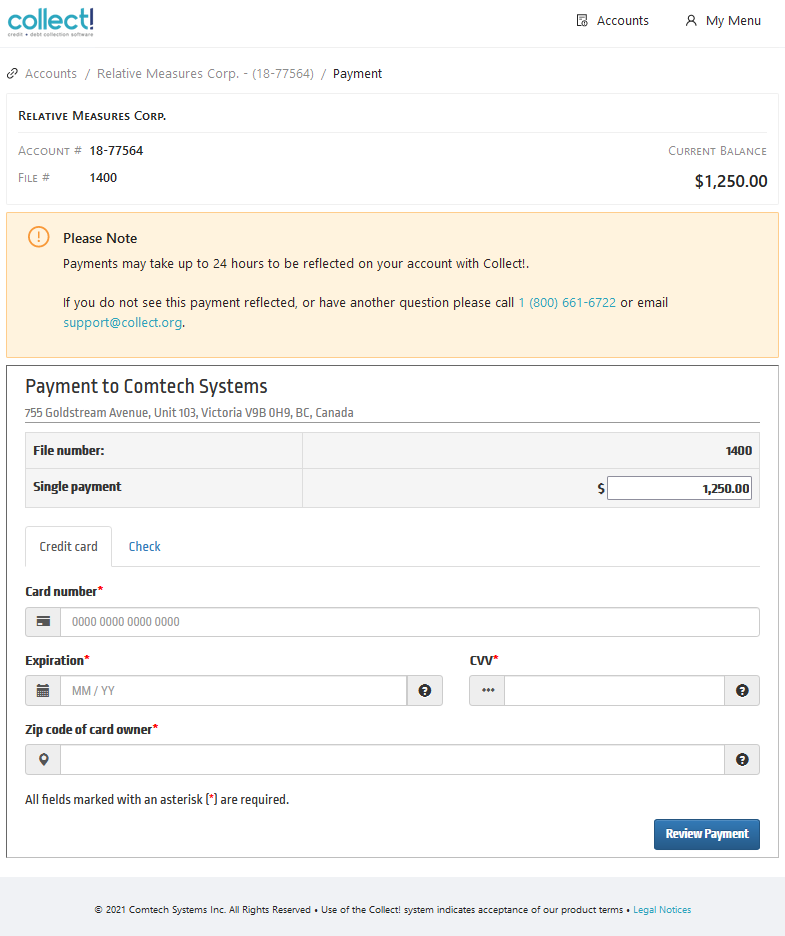
See a demo of the Consumer Portal Version 1 at the User Conference on Friday, June 3 at 9:30 am PST / 12:30 pm EST.
New Utilities in Member Center
Post-Dated Credit Card Transactions Utility
Collect!’s Credit Card Module uses promises to track future payments. As the gateway processes the payments, they are downloaded into Collect!.
While Collect! does not natively create future promised credit card transactions and store them on the debtor account in the same way that it stores future promised ACH transactions, the same functionality is now available with the use of a new utility.
This utility will create post-dated credit card transactions to give you an overview of future payments on the debtor transaction tab, and allow you to report on future credit card payments from Collect!, as you are already able to do with ACH future payments.
It is important to remember that the actual transaction is still initiated in the payment processor system. That means that changing a future transaction in Collect! does not change the actual future payment in the payment processor system. To do that, you will need to sign in to the payment processor system and also make a change there.
In the Member Center/Utilities/Scenario Packages look for a package called Post-Dated Credit Card Transactions. The package includes a detailed Read Me with instructions on use.
Remove Non-Numerics from Phone and SSN SQL Script/p>
Users on Version 13 can run this script to remove non-numerics from phone and socials. The package includes a detailed Read Me with instructions on use. Your method will vary depending on which minor release you are on and the size of your database.
New Experian ID Requirement

Change to Experian ID Requirements for US data furnishers
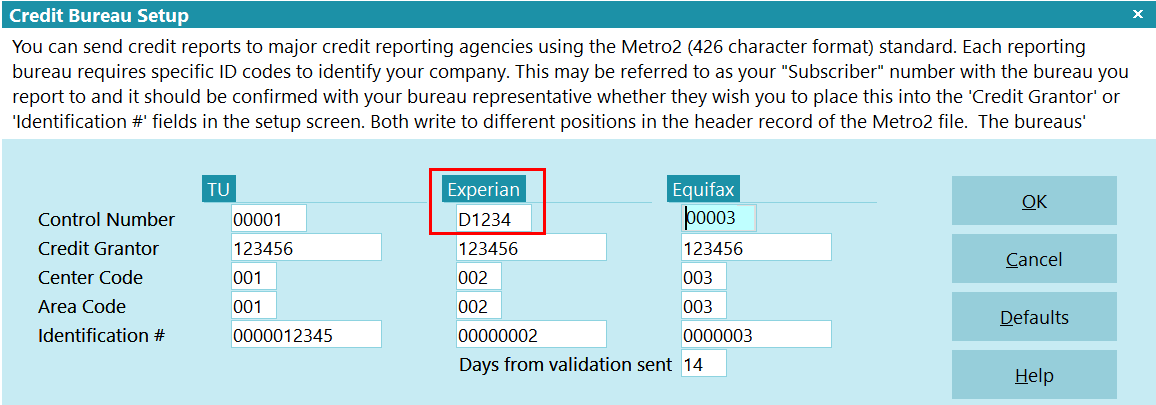
A number of US reporting companies have been advised that they need to update the Control Number in their Credit Bureau Setups Window with a site-specific 5-digit alpha-numeric code instead of a generic fill such as 00001 or 00002. The Notification from Experian may provide the code or request you to contact them for the code.
Please note, this is an Experian change, and not a Collect! software issue. The new code provided by Experian will need to be entered into your Credit Bureau Setup screen.
Once you have the code, access your CBR Setups by clicking Tools/Credit Reporting, then click Credit Bureau Setup button on the right. Once in, update the red-bordered field, seen in the screenshot below, with the 5-digit code that Experian has provided. The next time you output your METRO2 file, it will contain the Program Identifier they want you to use.
User Tip
Many options available for import
Complete many automated processes as part of your bulk import of new accounts. Assign accounts to a client, assign operators, schedule letters, plan reviews, apply action plans to new accounts, apply a different action plan to updated accounts, apply fees, interest and commission rates and more.
New import options were recently introduced, you can add a writeback utility import, and create sub-records.
Join the session outlining the new features of the Import Module at the user conference on Thursday, June 2 at 10:00 am PST / 1:00 pm EST. You will need your Collect! client # to register individuals at this registration link.

Release News
13.4 released
- Replaced “Use all types for controls” on the Company Detail form with a “Multiple” option on the Contact Control types.
- Added “Country” to Contact Controls.
- Added “Long Desc” to Debtor Transactions.
- Added a new field to the Client Settings called “Min Bal to Report” which, when populated, will stop Collect! from reporting new accounts to the bureaus that are below the amount. This is an override field. The Credit Bureau Setup form will still be used, if the client field is blank.
- Added Debtor Portal to the Source pick list for Phones, Addresses, and Emails.
- Added a field to the Credit Card Setup form called “Declined Type” which, when populated, will set the Transaction Type for declined credit card payments. If blank, no transaction will be posted.
- Hid the “Send Client Detail to Bureaus” box on the Client Settings form as there was no functionality linked to it.
- Hid the “Transaction Type” field on the Prepare Accounts for CBR form as there was no functionality linked to it.
- When toggling the “Only Numerics in Phone/SSN” boxes on the Screens and Messages form, Collect! will prompt asking if the user wants to run a query to update the database to remove the non-numeric characters.
- Added “Int Since Itemization, Fees Since Itemization, and Adjs Since Itemization” to the Assignment tab on the Debtor’s Financial Detail form for sites that can’t calculate the itemization values.
- Enabled Forced Recalc in the Payment Processing module, so accounts that are mode Closed will always be recalced.
- Added messages to the clearing of the Address OK boxes to ask the user if they want the Validation and CBR Send Hold dates cleared.
- Optimized the Group Tab financial calculations, on the Debtor form, to use SQL.
For more information, please visit the New Features Page here.
If you are interested in upgrading, please email support@staging.collect.org.
Note:
- If you are on Collect!’s cloud solution, congratulations, you are on the latest release and will be upgraded automatically as new releases come out.
- Updating and testing in your test environment before updating your production environment is always recommended.
- If you are using Web Host, and you are running 12.2 or earlier, you will need to update your Web Host to the latest version at the same time as you update Collect!.
- You can download the new update here. It takes only a few minutes to download and install.