
In this issue:
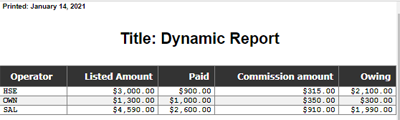
 Table Sample Table Output
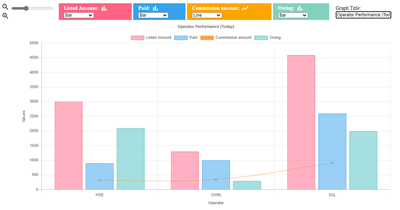
Sample Graph Output
Here are the most useful WIP list Help doc links:
https://staging.collect.org/cv12/Help/howtosetupthewiplist.html
https://staging.collect.org/cv12/Help/howtousethewiplist.html
https://staging.collect.org/cv12/Help/wipoptions.html#alwaysshownextcontactwhen
https://staging.collect.org/cv12/Help/howtouseasharedwiplistpooldesks.html
- Game-changing new Query & Report Generator
- Starting SOC 2 process
- Integrate with bookkeeping, texting
- Winner of review draw
- Registration open for Virtual User Conference
- Focus on Work in Progress Lists
- User tip – complete forms with EMF tool
- Release news
New Report Writing Tool

Introducing Collect!’s Query & Report Generator Version 1
Collect’s new Query & Report Generator will be a game changer for anyone currently writing reports using Collect!’s proprietary Report Writer tool. This tool can save you time and money on custom reports, without using SQL or the Collect! Report Writer code. As the name indicates, you can generate SQL queries on the fly using a very user-friendly layout. The Query & Report Generator can output resulting data in a range of table or graph formats. You can save your queries in your Report Library for repeated use. Query & Report Generator Version 1 will be included in the next updated Version of the Web Host expected by February 5. If you have not downloaded Web Host yet, wait until February, then download. Check the Help Documentation that will become live at the same time for instructions on how to download Web Host, and how to use the Query & Report Generator. Collect! members already working with an existing version of Web Host can contact Support to arrange for the installation of the Query & Report Generator and a quick run-through of the functioning. This should be no more than 30 minutes of tech time. There is no cost for the tool, only for the installation and brief training time. Expect to see Query & Report Generator Version 2 at this summer’s virtual user conference. Join Collect!’s Query & Report Generator demo on Thursday, February 11 at 10 am PST. Access GoToConnect from your computer using the Chrome browser and this link. https://my.jive.com/meet/969261525 to attend.- US: 571-317-3129
- Access Code: 969-261-525
- Computer Audio Supported
- Other Country dial-in numbers will be available when you connect.
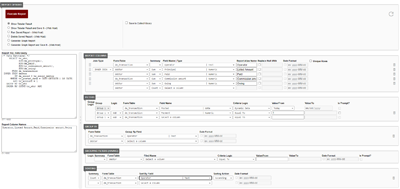 Table Sample Table Output
 Sample Graph Output
Security & Compliance Announcement

Collect! is starting SOC 2 process
This January Comtech Systems begins the SOC 2 compliance process. We expect to achieve SOC 2 Type I point-in-time attestation, followed a number of months later by SOC 2 Type II period of time attestation. We are working with KPMG as our auditors and Hitachi Systems as our technical consultants. At this time we cannot estimate a timeline for the availability of attestation reports.Integration Updates
Quickbooks accounting integration is saving Paul time
“We have recently added the QuickBooks Desktop integration into our Collect! Software. The integration saves hours of time each month by allowing the import of all client payments from Collect! into QuickBooks. We no longer need to manually enter each payment. Accuracy of the client check amounts is perfect. Importing the payments through the integration is effortless once the process is learned and takes only a few minutes to complete. After the installation process was completed, we simply need to start the Web Services in QuickBooks and run one report in Collect! and the process is complete. Working with Comtech Systems on this integration has been a great experience.” Paul Heihn, President, Northwest CollectorsThe Quickbooks integration enables the automated transfer of data between systems to reduce manual data entry. The online integration uses Quickbooks Online API. The premise integration uses Quickbooks Premise Web Connector to achieve the same functionality as the online integration. Check out the partner page on our website for a list of current endpoints. https://staging.collect.org/partners/ Our Help Desk will connect you with our integration developer to implement the QB integration in your system. Additional features and endpoints will be added depending on client need. There is no charge for the integration as long as you maintain an active Membership.
Sage 50 accounting integration seeking betas
If you use Sage 50, we are ready to build the same integration for Sage 50 as we have built for Quickbooks, and are currently seeking beta users. Contact our Help Desk if you use Sage 50 and are interested in being a beta site. The big plus of being a beta site is that your particular workflow needs factor into the integration development.
Vonage texting integration seeking betas
We have built an integration for Vonage’s Nexmo Texting API to send and receive text messages and are seeking beta users. The integration for desktop versions of Collect! (Entrepreneur, Professional, Corporate) use contact plans and templates. Development has been completed and we are seeking betas. The integration for Web Host versions of Collect! (Lite, Lite Plus, Lite Max) is underway and we are also seeking betas. About the Vonage Nexmo Texting API:- No set-up fee, no start-up fee
- Inexpensive, simple texting solution
- Users will need to establish their own account with Vonage
Tell others how Collect! works for you
Winner of the Review Request
Chris Dugan of Case Receivables Management Inc is the winner of our $500 Capterra review draw. Congratulations, Chris! You can still have your say by clicking here.Registration open for Virtual User Conference
Virtual Collect! 2021 User Conference June 3-4
Learn about Collect! and the industry from the comfort of your desk. Members: Free with unlimited signups Non-Members: $99 with unlimited signups Click here to register.Focus on Work in Progress List
Maximize operator productivity with automated work queues
Automation – setting your system to make routine workflow decisions and take routine actions – is key to efficient use of operator time. Collect! contains 3 key automation tools: Contact Plans, Payment Type Settings, and Work in Progress (WIP) lists. This is a quick review of how WIP lists can further your automation goals. In the last newsletter we reviewed how Contact Plans (aka Action Plans or Run Plans) schedule contact events. While contact events such as letters are produced automatically by the system and do not require operator attention, contact events such as calls and reviews do require operator attention. The WIP list is the scheduling tool to create operators’ contact lists on a multi-categorized and diarized basis. Use of the WIP list means that individual operators work in their individual WIP screen, which links them to all other screens and functions they need to move quickly through their tasks. Management can use the WIP screen tracking functions for a real-time overview of operator activity. Sales staff can use the WIP list for their follow-ups. The WIP list settings can be set for your entire system, for work groups, and for individual operators. It is important to configure the system-wide settings first, then over-ride them for individual operators. Management has many options, including force-feed of contacts with many sort options and a timer function. Individual operators are able to use a range of filters and the ability to add and remove columns to configure their WIP lists in the way that works best for them. The WIP list also provides operators with a running total of assigned and completed promise, phone, review, and other contacts on their list. The purpose of the WIP List is to focus operator attention on their tasks for the day, and to allow operators to have the information they need to complete the assigned task, set the next task, and move quickly to the next item on their list with a minimum of clicks. Here is an image of a WIP list for OWN showing all priorities, all accounts.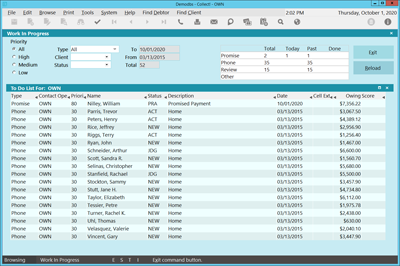 Here are the most useful WIP list Help doc links:
https://staging.collect.org/cv12/Help/howtosetupthewiplist.html
https://staging.collect.org/cv12/Help/howtousethewiplist.html
https://staging.collect.org/cv12/Help/wipoptions.html#alwaysshownextcontactwhen
https://staging.collect.org/cv12/Help/howtouseasharedwiplistpooldesks.html
User Tip
Complete forms with an Enhanced MetaFile
If you have standard forms, such as court forms, that you want to fill with data from Collect! an Enhanced MetaFile (EMF) could be a very effective solution. An EMF allows you to overlay data in very specific locations on top of an image of the form. In other words, the EMF command reads each form page as an image and places it as a background for the report text. In paper and pen terms, imagine a transparent page with data in exactly the places where a form needs to be filled laid on top of the form page. If the form changes so that the data needs to be relocated, then a new EMF will need to be created. On the positive side, after a brief learning curve, creating EMFs will be simple for you. If this interests you, open the Help page below to find the section on EMF. You can book a report specialists for a short EMF training session to get going or to build EMFs for you. https://staging.collect.org/cv12/Help/howtousethereportwritercommands.html#emfRelease News
12.11 Preview
Ability to split payments among invoices. Previously payments were applied to the oldest 196. Now payments can be divided among 196s at will with the Split Payments to Invoices utility in the Member Center. You will find it on the Utilities page under Scenario Packages. Intuitive field names for access rights. The previous numeric format 000000:ID required memorization or maintaining a list. The new record:field text format is easy to understand. For more information, please visit the New Features Page here. If you are interested in upgrading, please email support@staging.collect.org. Note:- If you are on Collect!’s cloud solution, congratulations, you are on the latest release.
- Updating and testing in your test environment before updating your production environment is always recommended.
- If you are using Web Host, and you are running 12.2 or earlier, you will need to update your Web Host to the latest version at the same time as you update Collect!.
- You can download the new update here. It takes only a few minutes to download and install.