
In this issue:
- New Comtech Customer Service Portal in Member Center
- User Conference recordings in Member Center
- CFPB rule change update
- Improved dialer result mapping
- Live at ACA in Vegas
- New Report Generator in Web Host
- New Dashboard available
- Partner news
- User tip – Summary of report and letter options
- Release news – 12.11 released
New Comtech Customer Service Portal in Member Center
Change basic account information on your own
Version 1 of our new Customer Service Portal has been deployed in the Member Center. The primary contact for your account can now go into the Collect! Member Center to update basic name and contact information for their account. As a security measure access to this portal is linked to the email associated with the person your company lists as the primary contact.
This is the first iteration of this portal; going forward you can expect to be able to identify co-primary contacts and access authorization and account information. Some features that are on the horizon include all authorized users being able to see the company without the ability to edit, adding and maintaining authorized users, and maintaining payment information.
User Conference recordings in Member Center
Access Collect! training track & partner presentations
At staging.collect.org/member-center/training-videos, select the 2021 Collect! User Conference tab for access to all the Collect! training and partner presentation videos. Thanks to all participants for your useful questions during the live conference.
Collect! Training Track Sessions
- What’s New in Collect! (since 2019)
- Elevate Your Support Experience – Getting the Most from Collect! Technical Support
- Innovate to Automate – Develop Your Own Personal ‘Operational Efficiency Radar’
- Report Generator Version 2 – Innovations since the February Demonstration
- Open Forum Session 1
- Dealing with CFPB Rule Changes
- Updated Collect! Dashboard – Completely Revised Platform for Managers, Clients & Operators
- Building Letters & Emails in the Report Generator
- Hidden Gems in Collect! – Functions You Should Be Using but Probably Aren’t
- Open Forum Session 2
Partner Presentations
- PDCFlow
- Focus One
- Solutions by Text
- Thrio
- Applied Innovation
- Agilytics
- Paypensity
- PLD Group
- Payscout
- Billing Tree
CFPB Rule Change Update
Announcing Collect! Version 13
Plans for enhanced programming and additional tools to deal with compliance requirements, specifically those brought about by impending CFPB rule changes, have evolved since the May newsletter and our session on CFPB rule changes at the June user conference.
Collect! remains committed to providing as much flexibility to users as possible, appreciating that jurisdictional and workflow requirements will vary.
Collect! development will add an additional layer of functionality, but not change any of your existing processes. That means you can move to Version 13 with no functional change. And, as always, we recommended that you test your new processes in a sandbox environment.
Key information:
- Collect! Version 13 will be available at no charge to customers who have maintained
Membership for more than 1 year
Version 13 will involve significant additions to the schema to accommodate the additional data required to accommodate Regulation F requirements. Version 13 will represent a total shift to the MS SQL database, and represent a final departure from the legacy Raima database. There will be no charge for moving from CV12 to CV13. - Adding a Rules Engine
Version 13 will provide the ability to set company-wide rules with the ability to over-ride for state rules. Creating your custom rule set enables you to add runtime compliance protection to internal functions, especially communication functions. - Adding Workflow Analysis Tools
Version 13 will provide the ability to test your workflow and communication tools against parameters and variables you choose. For example, you can test whether call attempts fall outside your rule set or if certain letters contain a certain text chunk.
Thoughts about how you can tackle the rule change:
- Identify if and how the rules apply to you; CFPB rules only apply to third party consumer debt in the US
- Identify which rules affect your workflow
- Review your policies and procedures in light of the rules that affect you
- Work with your clients to be provided with key data and permissions
- Update to Collect! Version 13 when available
- Clone your existing database to create duplicate sandbox environment
- Test, test, test in your duplicate sandbox environment
- Inform and train your staff well in advance of the effective date
- Implement in your production environment
- Monitor your activity
We will keep you informed via this newsletter and e-blasts, and can help you with the upgrade to CV13 and with cloning your existing database to create a duplicate sandbox environment.
Some resources you may find useful:
- ACA CFPB Resource Center
- CFPB Debt Collection Rule Resource Page
- CFPB October Rule Executive Summary
- CFPB December Rule Executive Summary
- AccountsRecovery.net “You Wanted a Rule, You Got a Rule” webinar series with John Bedard
Improved Dialer Result Mapping
Take 10 seconds to tell us what dialer you use
We are mapping dialer results to an enhanced Collect! call result set, starting with TCN. Automated and accurate result mapping is essential to classify phone results as ‘contacts’, ‘attempts’ or ‘do not count’ for compliance. We plan to map the 3 or 4 dialer systems most commonly used by Collect! users.
Please take 10 seconds to click on this link and tell us which dialer you use. Thank you. https://www.surveymonkey.com/r/66F6LBF
Live at ACA in Vegas

Drop by Booth 210 July 28 to 30
After over a year of virtual events, we are pleased to return to exhibit at ACA in person. Stop by our booth anytime and join our Innovation Stage Presentation just after the Expo Hall opens at 5 on Wednesday.
New Report Generator in Web Host
Download the Report Generator Version 2 as part of Web Host
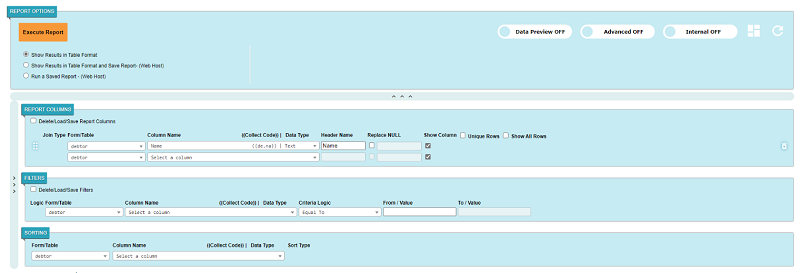
Collect!’s free Report Generator Utility enables you to select data, apply filters and sorting criteria to produce custom reports in Collect! outside of the more complex Report Writer Engine. The Report Generator offers a range of output formats including HTML, printer, files, emails and reports; many outputs can be stored for repeat use. Click on the ‘Report Generator Help’ link below to see screen shots and read more about the Report Generator.
The Report writer is available for download as a component of Collect!’s Web Host Remote Access System. If you have not downloaded or customized your Web Host, just download the latest version at no charge, with your Membership. Download info is in the ‘How To Set up Web Host’ Help Page linked below.
If you have customized your Web Host, you will not want a new download to overwrite your customizations. In that case, open a support ticket for the Report Generator to be downloaded directly into your existing, customized version of Web Host.
Two demo videos from the user conference are available at the link below: Report Generator Version 2 and Building Letters and Emails in the Report Generator.
Links:
- How To Setup Web Host
- How To Upgrade Web Host
- How To Customize Web Host
- Report Generator Help
- Demo Videos
- Open a Support Ticket
New Dashboard Available
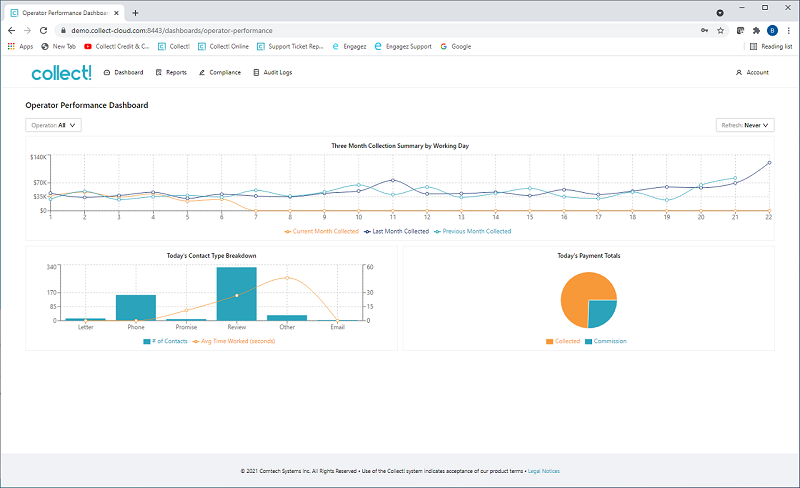
Dashboard offers manager, operator, client views
The new dashboard module includes:
- Manager, operator, client views
- Manager view includes Manager Dashboard and Operator Performance Dashboard
- Operator Performance Dashboard can be displayed to your collection floor
- Reports show data in graphical and tabular forms
- Complaints section provides categorization, sorting, document attachment, notes for processing complaints
- Documents section provides categorization, sorting, assignment to individual operators or operator groups, archiving for staff communication and training
- Audit logs show all changes to client, debtor or system
Click Here to see the user conference session on the dashboard.
Click Here to access the Dashboard Demo site.
Partner News
E-OSCAR automation saves operator time
A 50 seat Collect! user provided some raw numbers about how Collect!’s integration with Sonnet’s e-OSCAR automation has saved them staff time:
- 38,000 disputes managed by Sonnet
- 38,000 initial responses to disputes sent to Sonnet from Collect!
- 38,000 data sets they did not have to copy manually
- 78,000 attachments downloaded from Sonnet and automatically mapped to debtor accounts
For more information: https://palinode.io/sonnet/
Repay Purchases Billing Tree
Repay has announced that on June 15, 2021 Billing Tree officially became part of the REPAY family. In a joint statement, Billing Tree and Repay state: “REPAY and Billing Tree will continue to invest in existing partnerships, and our valued customers and partners will, in turn, have access to our best-in-class payment solutions. All integrated partners will remain a priority, and any projects in progress should continue with no disruption. At this time, the Billing Tree name will remain and will generally be accompanied with ‘a REPAY company’ tagline. While Billing Tree, a REPAY company, branding will begin to appear on certain communications and technology platforms, there are not planned changes to product functionality, features or login credentials.”
Click Here to read the press release.
User Tip
Summary of report and letter options available for Collect!
Reports:
- Native Report Writer, which requires training on our syntax
- New Report Generator, which is very useful for building simple reports
- 3rd Party Tools like Crystal Reports or Power BI
Letters:
- Native Report Writer, which gives the most power, and any printed letter can be stored on the debtor for future reference or auditing. This option requires training on our syntax.
- Rich Text Format (similar to mail merge), which is where you build the letter in Microsoft WordPad, then import to Collect!. The letters open in MS Word for printing. Copies of the Word doc are attached to the debtor for future reference or auditing.
- Mail Merge, which is where you build the letters in Microsoft Word, then build and export in Collect! that creates a CSV. MS Word will open for printing. No history kept in Collect! of what was sent.
We recommend either the Native Report Writer or Rich Text Format as both of these options allow for an audit trail, where Mail Merge is similar to outsourcing to a Letter Vendor and there is no copy of the image of what was mailed out.
Links:
- How To Build Reports Or Letters
- Report Generator Help
- How To Create An RTF Report
- How To Mail Merge From Collect! To Word
Release News
13.1 Coming
- Framework modifications to allow for quicker schema updates. This will allow for more tables and fields as they are needed.
- Integrated Contact Control Engine, driven by US CFPB changes, but useful for all regions.
For more information, please visit the New Features Page here.
If you are interested in upgrading, please email support@staging.collect.org.
Note:
- If you are on Collect!’s cloud solution, congratulations, you are on the latest release.
- Updating and testing in your test environment before updating your production environment is always recommended.
- If you are using Web Host, and you are running 12.2 or earlier, you will need to update your Web Host to the latest version at the same time as you update Collect!.
- You can download the new update here. It takes only a few minutes to download and install.