
In this issue:
- Create Emails Within Collect! using Standard Template
- Report Generator Training Video
- Are You Optimizing Email?
- Review Collect!, Get a Gift Card
- User Tips: New stuff this year
- Release news
Create Emails Within Collect!
New Scenario Package ‘Email Template & Promise Reminder’
Collect! has created a scenario package that can be used as the foundation for crafting ad hoc and template emails in a contemporary style. This email template works for clients, debtors, and cosigners.
File Contents:
- Blank template
- Email Promise Reminder Template
- Utility script to automatically schedule the promise reminder based on Promise Contacts
The process also allows for creating a PDF attachment alongside the email body, with four easy configuration options to toggle address blocks and footers on both the email and the PDF attachment.
This package includes a report that will schedule promise contacts and email reminders based on the number of days you specify before the promise contact is due.
To access this utility, Authorized Users can log into https://staging.collect.org/member-center/add-on-utilities/, click on Scenario Packages and select Email Template & Promise Reminder.
The Member Center offers Update Resources for premise sites, Training Videos, the current stock Reports and Letter Templates, Partner Integration Materials, Utilities, and access to Tickets and Remote Assistance. The Member Center can be accessed by anyone authorized by the Primary Contact on your Collect! account to interact with us about your Collect! system. The My Account section in the Member Center can only be accessed by the Primary Contact.
Report Generator Training Video
View in Member Center
A new video named How to Use the Report Generator is now available in Member Center/Training Videos/Installation & Setup.
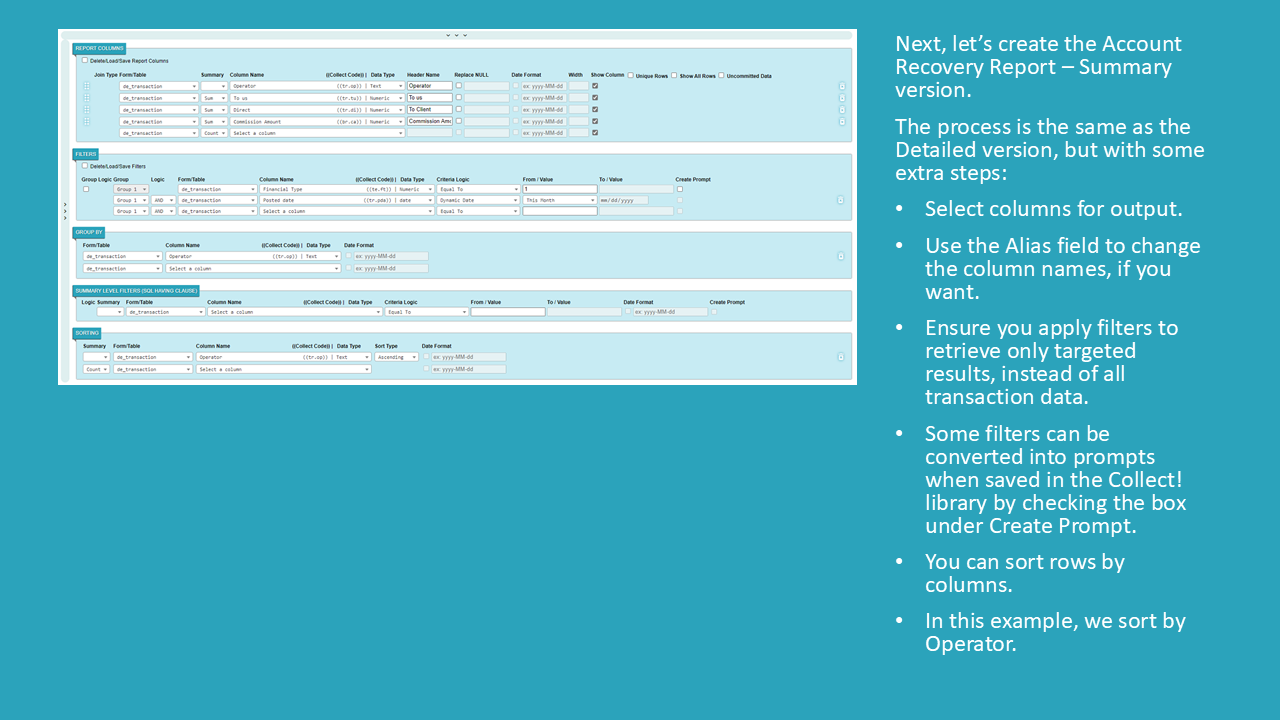
This new training video is intended to train novice users and help current users make better use of the Report Generator Utility. This utility enables you to select data, apply filters and sorting criteria to produce custom reports in Collect! outside of Collect!’s more complex Report Writer Engine. The Report Generator offers a range of output formats including HTML, printer, files, emails and reports. Many outputs can be stored for repeated use. For now, the Report Generator remains a part of the legacy Webhost system.
Web Host Report Generator Help Doc
Are you Optimizing Email?
Outbound, Inbound, Templates, Ad Hoc…
- Operators can send single emails ad hoc directly from Collect!, if:
- Your system is set up for emailing directly from Collect!, and
- That individual operator is set up for emailing in your Collect! system
- Automated emails are included in batch processes, if:
- Your system is set up for emailing directly from Collect!
- In each case the system will populate the email template with variable account data before sending it out through your email client
- Your Collect! system can be set to send outbound emails directly from Collect! through your office email server. Open a support ticket in the Member Center or by emailing support@staging.collect.org
- Your Collect! system can also be set to receive inbound emails from your configured mailbox on an existing email server such as Gmail, Outlook or other and supports multiple authentication methods. See the July newsletter for details
Review Collect!, Get a Gift Card

Write a SOURCEFORGE review and get a $20 gift card when it gets published.
- Include details about your experience with the product and support
- Provide some information about yourself so SOURCEFORGE can verify the validity of your review
- The review will only show your first name, last name initial, and job title in the review so you remain anonymous
- Writing a review should take no more than about 4 minutes
- Users in US, Canada, Australia, and many other counties are eligible
- Thank you for sharing your experience with Collect!
- Click this link to complete your review
User Tips
Support Refresher – These resources are available to you 24/7
- When You are Working in the System
- Press F1 on any field or screen in the system will open the most relevant Help doc for where your cursor is
- Popup windows will open if your cursor hovers over a field or a screen for more than a few seconds. You can disable or re-enable this at will
- Use keyboard shortcuts and hot-keys built into the system How to Use Keyboard Shortcuts
- Demo database for testing and experimenting before implementing new procedures in your production database
- Online Help
- Use the alphabetical organization in the index Collect! Help Index
- Use the Search Bar at the upper right of the Help Pages
- Use the Navigation Bar on the left of the Help Pages
- Additional Functionalities
- Member Center, requires
login
- Revision history
- Training videos organized into Setup, Working, User Conference Recordings
- Latest set of stock reports and letter templates organized by Debtor, Client, Operator, Financials, Compliance and Misc.
- Partner integration tools
- Utilities organized into Pick Lists, Control Files, Scenario Packages, Writeback Reports and SQL Scripts
- Ticket overview and preferred location for you to open a new ticket because it enables classification
- My Account Site in the Member Center, company updates are only available to
the primary contact on your Collect! account
- Ticket overview and preferred location for you to open a new ticket because it enables classification
- Edit your company profile
- Edit your authorized users
- Billing overview
- White label program sign-ups
Quick question: what key do you press when you are in Collect! that will take you to the most relevant Help Doc to where your cursor is? (answer in red above).
Release News
13.7 in Ongoing Development
We are currently focused on re-writing the Payment Processing module. The new design will allow for multiple gateways, simpler coding, uniform processing between ACH and cards, client payment processing, seamless integration with the new portals, and much more.
Enhancements since the last Newsletter:
- Added “@@apppath” to the report commands that will return the Collect! root directory.
- Changed the default extension for printing to File to be TXT instead of HTM.
- Collect! will now shut down if SQL Server is no longer available instead of displaying prompts.
- Disabled some code that was designed to clean up orphaned BLOB records as it was causing significant performance issues.
- Added a check box to the Import Field Options form called “Exact Match” which, if checked, will use an exact match on Must Equal Default Value instead of the default of partial match.
- If a report executes an @SQL command that contains a reference to an external database it will now prompt the user if they want to proceed.
- Improved the @REPLACE command in the Report Writer to support commas (~~) and spaces (“) using the special characters.
- Optimized the batch processing automated contacts to only look at the last 30 days of contacts when run from the Task Scheduler.
- Added a prompt to the log viewer max months fields to get users to confirm that they are changing the value.
For more information, please visit the Version 13 Revision History page here.
For more information, please visit the New Features page here.
If you are interested in upgrading, please email support@staging.collect.org.
Note:
- If you are on Collect!’s cloud solution, congratulations, you are on the latest release and will automatically be updated as new releases come out.
- Updating and testing in your test environment before updating your production environment is always recommended.
- If you are using Web Host, and you are running 12.2 or earlier, you will need to update your Web Host to the latest version at the same time as you update Collect!.
- You can download the new update here. It takes only a few minutes to download and install.