
In this issue:
- 2025 Support & Pricing Announcement
- Updated Client Portal
- New Inventory Management Tools
- Integrated Payment Gateways
- User Tips: Support Tools & Procedures
- Release news
2025 Support & Pricing Announcement
The following support & pricing changes will go into effect on January 1, 2025. Any
pricing not specifically mentioned in this piece remains unchanged.
Cloud Based Monthly Subscription Pricing
The Collect! cloud subscription includes hosting of your system and data on a dedicated
virtual machine at the AWS data center closest to your head office, updates, upgrades,
backups, maintenance, use of all modules, access to the Member Center, access to the
Help Desk, and very discounted technical service rates. Letting Collect! manage your
system means you can focus on business.
| Basic Edition + 1 User | Xpress | Entrepreneur | Professional | Professional Plus | Corporate |
|---|---|---|---|---|---|
| Monthly | $149 | $249 | $349 | $599 | $1,199 |
| Annual – Save 16%% | $1,490 | $2,490 | $3,490 | $5,990 | $11,990 |
| Additional Cloud Seats | Unchanged | ||||
Legacy Premise Versions 8 & 11 Support Discontinuation
To enable staff to focus on the latest version, Collect! is advising users of Version
8 & 11 premise systems that support for these legacy systems is being discontinued
according to the schedule below. That means that documentation remains available, but
staff is no longer trained or available to modify reports, built import maps, customize
letters or provide advice or customization services for Versions 8 & 11. Current
users of Versions 8 & 11 are advised to submit tickets for any further modifications
promptly so they can be completed before support discontinuation. Support for Versions
12 & 13 remains unchanged.
Support Discontinued:
- Version 8: January 1, 2025
- Version 11: April 1, 2025
To our valued legacy users: While we can appreciate the “if it ain’t
broken…” approach, and are glad that you have had 10 or more years of use of your
premise software, we encourage you to use this opportunity to upgrade to the latest
version, and then keep yourself updated. The easiest way to remain current and have
access to all the latest features and tools is to move to our hosted solution – let us
take care of your system so you can take care of business! Version 13 is also
available as a premise deployment.
Keeping yourself on the latest version means that you can take advantage of Collect!’s
latest. A few examples: compliance module, 4 options of built-in MVN, consumer portal,
white-label texting programs, an inventory management tool, SOC 2 level security.
Premise Membership
The Collect! full membership provides premise users with updates, upgrades, access to
the Member Center, access to the Help Desk, and very discounted technical service rates.
The Updates Only Membership provides premise users with updates within your major
version and very discounted technical service rates.
| Membership | First Seat | Additional Seats | Legacy Surcharge |
|---|---|---|---|
| Standard Membership Annual | $600 | $300 | 6% for Version 12 |
| Updates Only Membership Annual | $420 | $180 | 6% for Version 12 |
Please Note: If you have an active Membership in place, support will be
available to you until your Membership expires. At that time, you will not receive a renewal
invoice. You will receive an offer to upgrade.
Premise Additional Seat Pricing
The additional seat price will be $999 per seat for Members and $1,998 for non-members.
This is a one-time purchase for the seat. The Membership portion will remain annual.
For example, a non-member adding a seat would pay $1,998 per seat. A Standard Member
adding a seat would pay $1,299 per seat where the $999 is one-time and the $300 would
renew annually with the Membership.
Service Pricing
The price for Comtech Systems to apply your premise patches will now be $127.50 per
patch request.
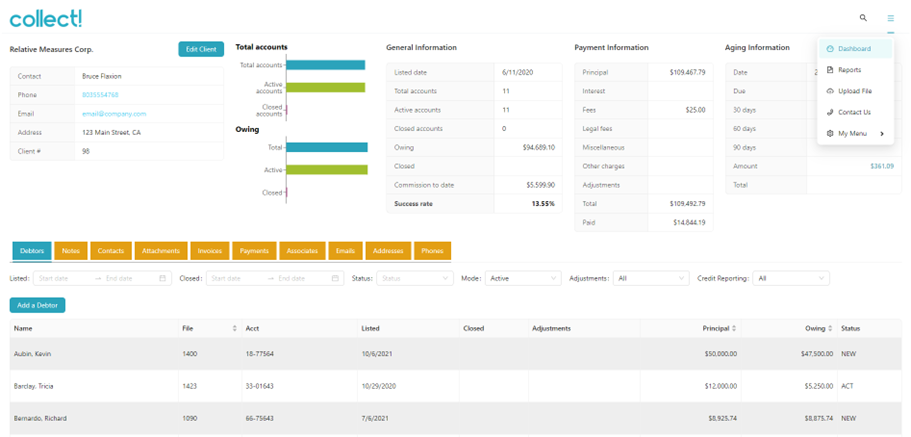
New Client Portal Replaced Legacy Webhost
The new Client Portal offers more features than the Legacy Webhost system, and is built
on a modern, stronger and more flexible platform.
You can:
- Add your logo and brand colors
- Configure the data you make available to your clients
Your clients can:
- View parent or all clients in their group
- Update their information
- Upload data files
- View dashboard summaries
- Add accounts
- Add account notes & payments
- Upload documents to Attachments
- Search for accounts
- View contact and payment history
New Inventory Management Tools
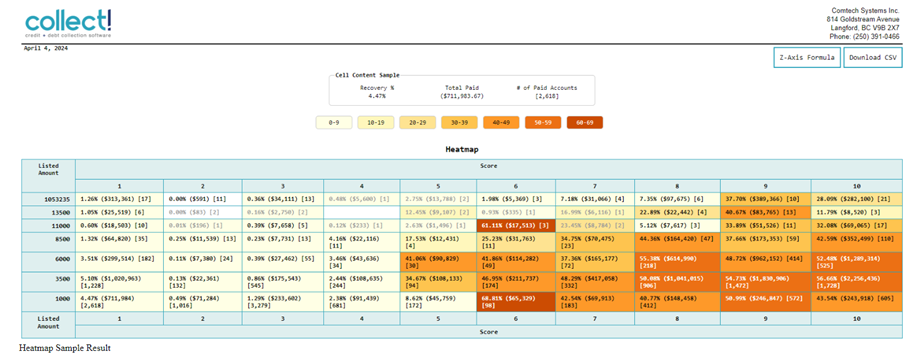
Set your data segmentation parameters
In the Member Center/Utilities
scroll down and click on the Heat Map Plus Inventory Management Process to download a
utility designed to empower you to explore and visualize relationships within your data.
Use this visual tool to identify patterns, trends and correlations that may not be
discernible in tabular form to make better decisions and find new opportunities.
This system relies on features available in Version 13 and includes reports,
configurable distribution rules and instructions for use.
Integrated Payment Gateways
Can You Make Use of an Existing Integration?
Collect! has built integrations that include reconciliation for cards and ACH payments
and ACH returns. Payment processors use their own combination of proprietary and reseller
gateways with some only using popular reseller gateways like USAePay and NMI, and some
using only their proprietary gateway(s). If your processor uses one of these gateways,
you can make use of Collect!’s integration with this gateway for automated real-time
updating of Collect! Collect! will continue to add integrations once the payment
processing rewrite is complete.
- Reseller gateways: USAePay & NMI
- Repay’s proprietary gateways: Payrazr & Repay
- Payscout’s proprietary gateway: Paywire
- PDCFlow’s proprietary gateway: PDCFlow
- PayNSeconds’ proprietary gateway: PayNSeconds
- Payment Vision’s Proprietary gateway: Payment Vision
User Tips
Use F1
In Collect!, when you press F1, the system will bring up the most relevant Help document
for the field your cursor is in. This is a fast and easy way to make your life easier,
so don’t be shy…press F1 as often as you want.
Training Videos
The Member Center contains many setup and how-to videos on many functions in Collect!.
If you have not checked them out, take just a minute to review the contents of the 3 tabs:
Installation & Setup, Working Accounts and 2024 User Conference. The middle tab is
most useful for active sites.
Coming soon: How to Set-Up and Use the Report Generator Utility Training Video.
Immediate Answers
You call support with a question that does not seem complex, but the person who
answers the phone creates a ticket instead of dealing with your question on the spot. Why?
Our support staff has a range of experience, from newer staff who usually manage the phones,
to very experienced staff. Since the worst consequence of providing a fast answer is providing
a misleading answer, creating a ticket enables us to provide experienced oversight of each
ticket. We are aware that this is not always convenient, and in considering how to handle
incoming issues we have to weigh speed versus completeness and accuracy. Considering the
consequences for Collect! users, our procedures support accuracy more than speed.
Speedy Answers
You create a ticket with a question that does not seem complex, but it still has
to be put into the ticket queue, and does not get dealt with instantly. Why?
Incoming tickets also vary in complexity and difficulty for staff, so our procedures have
to ensure that each ticket is handled in turn and difficult tickets do not languish while
staff deal with newer but more straightforward issues. This is why we expect our support
staff to work tickets assigned to them on a first-in/first-out basis. When tickets come
in, they are triaged and assigned to the most suitable staff person and added to their
ticket list. Having said that, one experienced staff person does usually handle
application question tickets so they are usually dealt with promptly.
Release News
13.7 in Ongoing Development
We are currently focused on re-writing the Payment Processing module. The new design will
allow for multiple gateways, simpler coding, uniform processing between ACH and cards,
client payment processing, seamless integration with the new portals, and much more.
Enhancements added to 13.7 so far:
Display And Environment
- Added the ability to sort Client Debtors by Listed date descending.
Contact Management
- Added “Include in Client Portal” to the Contact Plan form to allow you to let clients run contact plans.
Report Writer
- Increased the size of the File Name field on the Report Options form to 255 characters to match
the File Name field on the Print Report form. - Added the ability to print to alternate addresses in Letter Service.
Importing
- When using @@d in the Default Value field on a Field Specification form, we are now checking the
Import Map’s global date format, so you don’t have to specify the date format on the field level. - Added a check box to the Import Field Options form called “Exact Match” which, if checked, will
use an exact match on Must Equal Default Value instead of the default of partial match.
Credit Bureau Reporting
- Added an option to the Credit Bureau Setup form called “Force Age Out” which, if populated,
will automatically set accounts to age out after the specified number of years. The checking
processed in set in the Debtor Recalc and CBR Metro Reactivation process.
For more information, please visit the
Version 13 Revision History page here.
For more information, please visit the New Features page here.
If you are interested in upgrading, please email support@staging.collect.org.
Note:
- If you are on Collect!’s cloud solution, congratulations, you are on the
latest release and will automatically be updated as new releases come out. - Updating and testing in your test environment before updating your
production environment is always recommended. - If you are using Web Host, and you are running 12.2 or earlier, you will
need to update your Web Host to the latest version at the same time as
you update Collect!. - You can download the new update here.
It takes only a few minutes to download and install.