
In this issue:
- New Inventory Management Tool
- User Conference Registration Open
- Defend Yourself Against Common Social Engineering Tactics
- How to sign up for Collect!’s long or short code texting program
- User Tips: Tracking Bad Addresses
- Release news
NEW! Inventory Management Tools
Segment, assign and manage accounts the way you want
Explore and use these new Collect! tools to segment your accounts according to your criteria, and then assign varying workflows to different account segments.
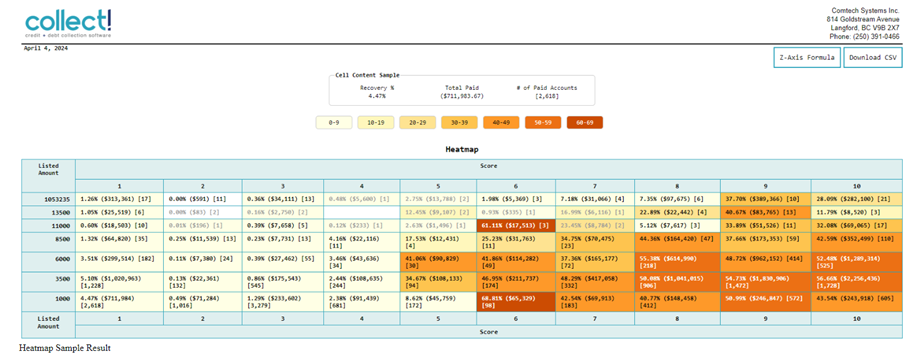
New Heatmap Tool
- Intended for you to explore and visualize relationships within your data
- Configure the tool to identify which accounts are to be included based on different filtering criteria
- Can be configured to read scores from fields other than the ‘score’ field or use it without ‘score’ if your company does not use the score attribute
- Can be modified to use customized shading and colors
- Lets you identify patterns, trends and potential correlations that are hard to see in tabular form
- Includes configuration options in how the heatmap segments your data
- You choose the variables used for analysis and the granularity of the data segmentation
- Prompts are accompanied by clear explanations
- Includes Enhanced Analysis with Weighted Recovery Percentage
- By default, the report uses the conventional method of emphasizing the amount collected in relation to the listed amount
- When the weighted recovery option is enabled, the analysis shifts to emphasize the payment amounts themselves, thereby offering a more comprehensive analysis, focusing on significant payments and their impact on recovery performance.
Sample Heatmap Result
Distribution Rules
- Distribution Rules Report enables you to distribute account buckets identified by the Heatmap
- Uses data from active accounts with an outstanding amount greater than zero
- The report facilitates the transfer of accounts to designated operator desks based on predefined conditions that match your company’s policy
- A contact plan can be executed on each transferred account, depending on the configuration within the distribution rule
- Report functionality includes
- Report operates on tagged accounts, and end users have full control over which accounts to include for transfer. Additionally, it has the ability to delay transfers in each round for up to a certain number of months, depending on your company’s policy
- Report has a Preview Proposed Distribution mode which enables you to review accounts before they are transferred
Workflow Report
- The Workflow Report manages accounts that have not received payments, RPCs, are not
scheduled for future payments
- Low level accounts can be directed to backline operator desks such as autodial, autoemails etc.
- Report settings and duration parameters are adjustable
- This report works through the Collect! Scheduler to relocate accounts on a daily basis
- Clients who do not have the scheduler can execute the process manually
User Conference Registration Now Open

Register Now for the June 13 Virtual User Conference
- Enjoy from the comfort of your desk; participate as much or as little as you like
- Free for cloud subscribers and members. $99 for non-members
- Unlimited staff participation; non-members can register any number of staff for $99
- Register for access to recordings, if June 13 does not work for you
- New registrants accepted until the end of June; access recordings until June 30
- Prizes of seats, modules, membership discounts or technician time to 3 most active participants
- Registration Link
- Program Link
Defend Yourself Against Common Social Engineering Tactics

How not to fall for phishing, malware, and online pop-ups
Using the latest technology means you need to be aware and on guard against common security risks. The 8 most common technology security risks are usually identified as:
- Phishing uses misrepresentation to get you to reveal sensitive information such as passwords or download malware into your system. Phishing usually involves emails or phone calls that tell you about a problem with an account, and asks you to click a link or reveal account information over the phone. Even if someone you know sends you a link that looks weird or asks you for a password, stop and ask yourself if this looks phishy.
- Pretexting involves a fraudster creating a fake identity of a supplier, inspector, or computer technician to fool you into disclosing information. Individual contacts may not raise red flags, but over time the pretexting effort can accumulate enough information to fake your identity.
- Malware, or ‘malicious software’ is any software with harmful intentions. Many phishing attacks are attempts to infect your system with malware. Malware may steal your data, corrupt your data and hold it for ransom, or interfere with your system.
- Online pop-ups can infect your computer by popping up a window that opens when you visit a website. While many pop-ups are legitimate and helpful, some are Trojan horses that will initiate the download of ransomware or a virus. Most often the red flag is something that is alarmist or unreasonable, such as a claim that your computer is infected with a virus and their software will clean your system. Also be careful of service offers that may be bogus; you should always be the one to reach out to service providers.
- Outsourced IT Services, from hosted systems like Collect! to your contracted IT providers vary in their adherence to security standards. Check their security documentation and attestations. For the record Collect! maintains very high security standards and is HIPAA and SOC 2 compliant. Collect!’s Security & Debt Collection Compliance Webpage & Collect!’s Security Trust Center
- Wifi and remote work requires security precautions to protect your system. If you access your business network remotely through an unsecure server, others could see your traffic and access your system. In public spaces, you may fall victim to a ‘spoofed’ internet server that looks like a legitimate wifi connection but is not. Ideally, you will only connect to sensitive information via a secure server you have reasons to trust.
- Passwords should be required to meet complexity standards and regular changes to resist common hacking attempts such as password spraying (use of commonly used passwords) and brute force attacks (use of algorithms that spin through character combinations at great speed).
- Old equipment that is disposed of without electronically shredding data and physically shredding hard drives can hand your business information to unreliable parties. Take care to follow best practices when disposing of old devices.
How to sign up for Collect!’s long or short code texting program
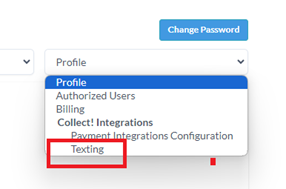
Web Form Available in the Member Center
Get information about Collect!’s long code and short code texting programs by clicking here and scrolling to the bottom of the page.
- Short code program powered by Solutions by Text is recommended for US 3rd party collectors due to carrier restrictions
- Long code program powered by Wavix recommended for US 1st party collectors and all Canadian clients
The primary contact for your account can sign up for texting with the new webform available in the Member Center. The information you provide will let us set up your account, and will be provided to the technician who will reach out to you to implement texting in your system.
User Tips
How Does Collect! Control for Bad Addresses
Collect! has several methods to ensure you are not sending mail to bad addresses:
- You can mark an address as OK by adding a tick to the ‘Address OK’ box at the left of the main debtor screen
- You can use the Required Address Fields Form to set mandatory address lines that must be filled. Collect! will not print to an address that does not meet these mandatory standards
Release News
13.7 in Development
We are currently focused on re-writing the Payment Processing module. The new design will allow for multiple gateways, simpler coding, uniform processing between ACH and cards, client payment processing, seamless integration with the new portals, and much more.
For more information, please visit the Version 13 Revision History page here.
For more information, please visit the New Features page here.
If you are interested in upgrading, please email support@staging.collect.org.
Note:
- If you are on Collect!’s cloud solution, congratulations, you are on the latest release and will automatically be updated as new releases come out.
- Updating and testing in your test environment before updating your production environment is always recommended.
- If you are using Web Host, and you are running 12.2 or earlier, you will need to update your Web Host to the latest version at the same time as you update Collect!.
- You can download the new update here. It takes only a few minutes to download and install.