
In this issue:
- See us at ACA in Chicago
- Use TCN chat in your Collect! Consumer Portal
- Member Center now enables payment gateway configuration
- Use PDCflow’s latest technology
- New Client Portal ready for beta
- User Tip: New Help Docs and User Conference recordings
- Release news
See us at ACA

See you in Chicago July 26 – 28
Say hello to Collect! in Booth 804 at the ACA International Convention Expo.
Conference link
Registration link
Use TCN Chat in your Collect! Consumer Portal

TCN – it’s not just for dialing anymore!
TCN account holders can link TCN Chat functionality to the Collect! Consumer Portal
on their website to enable consumers to access TCN’s advanced chat bot and agent chat
functions from your consumer portal.
Preparation involves installing the Collect! Consumer Portal on your website and
configuring it to your requirements plus engaging with TCN for chat setup and training.
TCN chat provides a range of options for bot responses and live agent chat that their
trainers will help you with.
Once the Consumer Portal and TCN Chat are in place you will follow instructions in Collect!
Help documentation to download the TCN Chat API Key (code snippet) from your TCN Omniboss
dashboard and install it in your Collect! Consumer Portal.
Customer portal now enables payment gateway configuration
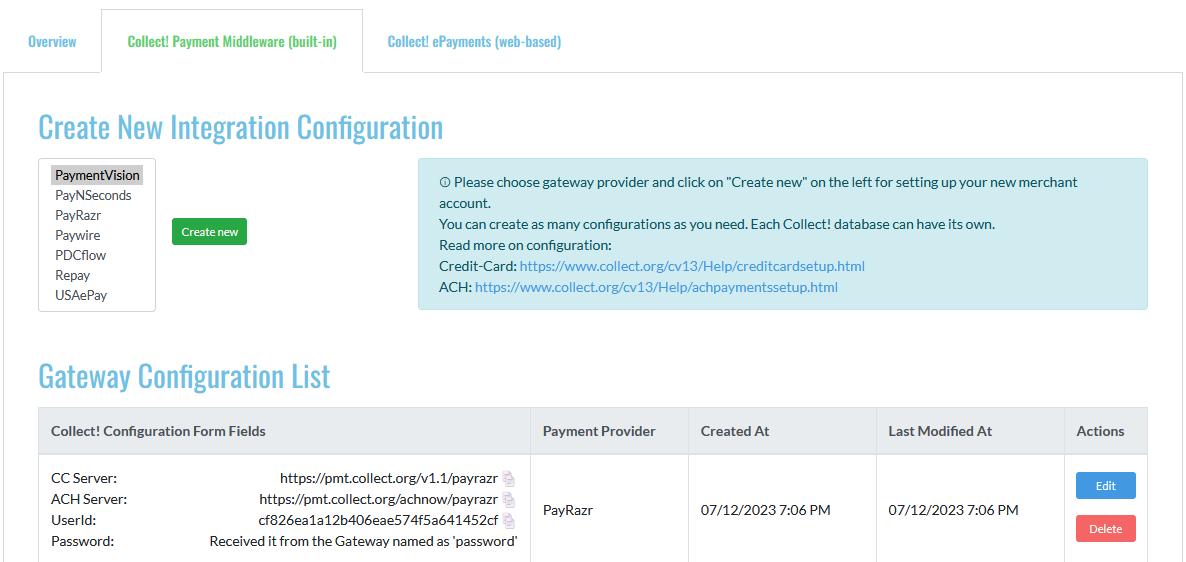
Edit or configure your use of integrated payment gateways
For Collect!’s major payment integrations you are now able to edit your configuration or
create a new configuration using new self-serve tools available in the Member Center.
Your payment company processes your transactions through payment gateways. The payment
processor you have an account with, for example Repay, Payscout or PDCFlow, use proprietary
payment gateways and/or non-proprietary gateways that resell processing services for the
actual transaction. Gateways vary in how collection friendly they are, the services they
offer, and their technology. Integrations are not built for processors, they are built
for the payment gateways that the processors use.
Collect! has built a number of integrations with payment gateways that allow data to move
seamlessly between systems and provide real-time payment updates in Collect!.
The primary contact on your Collect! account can now edit existing configurations and set
up new configurations for the following processors’ gateways.
| Processor Company | Integrated Gateways Available for Self-Configuration | Processing |
|---|---|---|
| Repay | Payrazr | Cards & ACH |
| Repay | Repay* | Cards & ACH |
| Payscout | Paywire* & ** | Cards & ACH |
| PDCFlow | PDCFlow | Cards & ACH |
| PaymentVision | PaymentVision | Cards & ACH |
| PayNSeconds | PayNSeconds*** | Cards & ACH |
| USAePay | USAePay | ACH Cards use native Collect! integration |
* Repay and Payscout also need the CLR module installed for offsite tokenization.</br />
** Payscout also needs the CLR module installed for gateway fee calculation if fees are charged.</br />
*** PayNSeconds functionality restricted to items processed from Collect! being recorded.
Automatic reconciliation of transactions initiated outside Collect! not available yet.
Use PDCflow’s latest technology
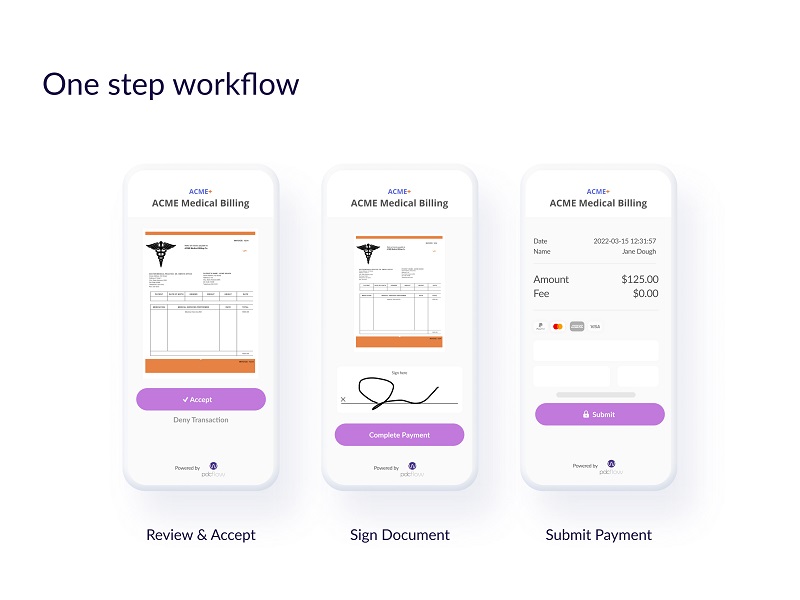
Send bulk transactions from Collect! with PDCflow’s integrated solution
PDCflow’s Flow Technology allows you to send bulk transactions through your Collect! System.
This integrated solution is Regulation F compliant and can be used to send one to thousands
of requests at a time through email or SMS. With Flow you can:
- Send payment reminders
- Send disclosures, debtor notifications, or consent to text
- Send authorizations for Regulation E compliance and protection against chargebacks
- Send debtor statements, settlement letters, itemized statements through text or email
- Send letters, documents, receipts, payment requests
- Capture simple signature requests
For more information, please contact Heather Harris at heather@pdcflow.com or call 1-877-732-4814.
New Client Portal ready for beta
Cloud sites invited for beta
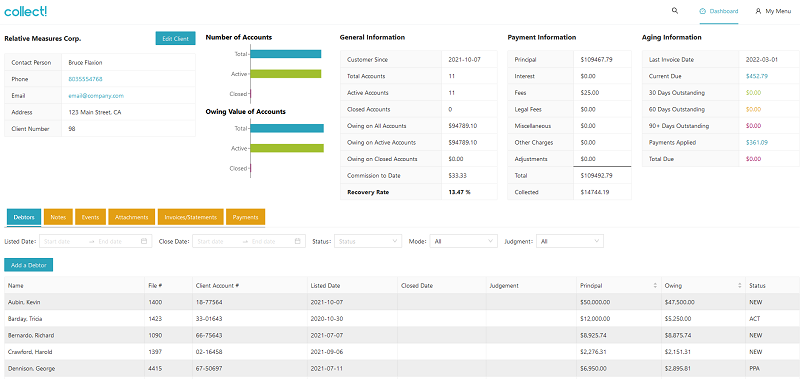
The new Collect! Client Portal replaces the legacy Web Host system. The new portal will
eventually have all the same features and more, but built on a newer, stronger, more
flexible platform that enables further development. Features are being added as we go.
We are seeking cloud users without any Web Host customizations as beta sites. If you
would like to make early use of these enhanced functionalities email contact
support@staging.collect.org.
Please Note: Due to the new architecture, customizations will not
be supported. If you would like to build your own client portal, our API documentation
is available here:
How To Use The Rest API
User Tip
New Help Documents Available
How To Setup The Collect! Consumer Portal
How to Install TCN Chat Widget into the Collect! Consumer Portal
Use SQL Server for Email from Collect! instead of HMail
User Conference Recordings Available
Access recordings and presentation PDFs of the 2023 User Conference sessions under
2023 User Conference on the Training Videos page.
Note the link at the top that will download a zip file with all the presentations.
The 2023 session list:
- What’s New in Collect!
- New Features for Credit Bureau Reporting
- New Features in the Report Utility
- Collect! Consumer Portal
- Open Form Session
- Import Tips and Tricks from Down Under.
Release News
13.6 Released
Display And Environment:
- Added “Config File” to the Operator Detail form, which will allow you to specify a
configuration file on a per Operator basis. Warning: changing the SQL username or
password does not cascade to all operators. - Added “Repeat” and ” Day” to the Work in Progress To-Do List as insertable columns.
- Updated Country picklist to match current countries as defined by ISO.
- Increased the Debtor “Master” field to accommodate the same number of characters as the
Client Number. - Changed all “Action” buttons to be “Run Plan”.
Financials:
- Updated variable interest to first check the global folder for a vinterest folder before
looking in the current bin folder.
Contact Management:
- Added Semimonthly to the Contact Repeat options which, when selected, will use 1st and 15th
as the contact repeat dates.
Report Writer:
- Added the ability to email using SQL’s built-in email functionality with Standard edition.
- Re-enabled the Configure and Delete Email Configuration buttons on the Reload Work in
Progress form to configure email settings. - Replaced the “Enable SMTP” box on the Operator Email form with “Email Type”, which has MAPI,
SMTP, and SQL as the types. - Added “Email Type” and “Configure Email” to the Report and Printer Setup form to configure an
email account for batch emails. - Added “Send Batch Emails as Operator” to Report and Printer Setup form which, when enabled,
will use an Operator’s email configuration to send emails instead of the system configuration. - Enabled the ability to email a report that starts on any destination. When printing a report
to a destination that is not one that has an email field, you should use @EMAILTO in the report
and have Skip Empty Email Address selected on the Print Form. This will enable the email to go
to the specified email. - Added the ability to specify the length of a prompt value. (Example: @tvarPrompt* = ?64 Please
enter a value.) Where in this example, the width of the prompt will be 64 characters.
Credit Bureau Reporting:
- Updated the “Report By Client” CBR functionality to be able to specify the Identification
Number in the Client User fields. - Added “Credit Grantor Behavior” to the Client Settings form. When enabled, accounts for that
Client will behave like 1st party instead of 3rd party. - Added “Report as Client” to the Report to Credit Bureaus form. When enabled, if there is only
1 selected Client, the client number will be added to the Metro2 filename and the Client’s
address will be inserted into the header instead of the Company Details.
Payment Processing:
- If “Use group owing for final payment” is enabled in Credit Card Setup, then when a grouped
debtor account is closed, all Credit Card Notification Letter Contacts and End of Payment Review
Contact records are moved to the next active Debtor in the group with the greatest owing.
For more information, please visit the
Version 13 Revision History page here.
For more information, please visit the New Features page here.
If you are interested in upgrading, please email support@staging.collect.org.
Note:
- If you are on Collect!’s cloud solution, congratulations, you are on the
latest release and will be automatically as new releases come out. - Updating and testing in your test environment before updating your
production environment is always recommended. - If you are using Web Host, and you are running 12.2 or earlier, you will
need to update your Web Host to the latest version at the same time as
you update Collect!. - You can download the new update here.
It takes only a few minutes to download and install.