
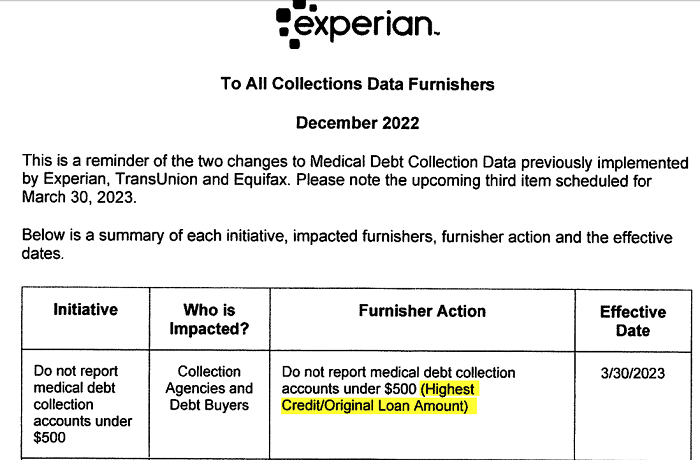
We’re reminding everyone in the USA that the Credit Reporting regulation changes for Medical Debt effective March 30, 2023.
Anyone who is on Version 13.5 or higher has the necessary features to accommodate this, as we built them into Collect! when we released the changes for the July 2022 regulation update that required agencies to change from 180 days to 365 days from Date of Service/Delinquency Date on Medical Debt reporting.
This process will go out and find all accounts with an Original Assigned amount less than $500.00 within the current client and insert an “ASDA” (Delete from Credit Bureau) Metro Contact on them if they have been reporting in the past. They will be automatically turned OFF for further reporting after you run your next output. For accounts that have never been reported before, but a future-dated In Progress “AS93” (seriously past due/in collections) Metro Contact is detected, that Metro will disappear and the account will be turned OFF for reporting.
Please read this document in its entirety before executing any steps.
Steps
- Ensure your Credit Bureau Setups (System -> Preferences -> Credit Bureau Setup) have the checkbox beside New Bus – Ignore reporting owing less than checked ON.
- After making system changes, all users should log out of Collect! and then go back in.
- Browse Clients and use Search Criteria
to find your Medical clients. On a per client basis, navigate to the Advanced Client Settings
and perform the following action. Repeat this process until all Clients have been updated.
- Choose your Min value of from the picklist dropdown in the lower right
of the window. As per the below screenshot, the Credit Bureaus are using Field 12 (which
for agencies and debt buyers is original assigned amount) in the Base Segment to make
this determination threshold value decision. In Collect!, Field 12 is the amount in the
Principal field. Your options for Min Value Of are:
- Total Principal (recommended): The value in the Principal field (sum of all “196 Original Principal”) transactions.
- Original Principal: The value in the Original Principal field (first instance of the 196 transaction).
- Owing: This is the value in the Owing field. It is not recommended for this process as it may exclude legitimate accounts that have payments. This option would only be used if you wanted to factor in Interest and Fees for NEW accounts.
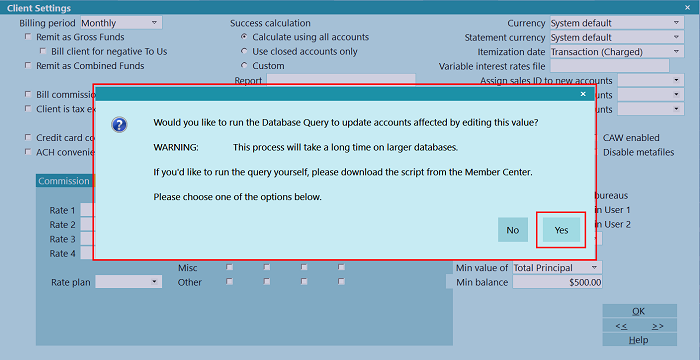
- Enter 500.00 into the Min balance field AND push TAB or ENTER on the keyboard.
- On the pop-up message, select YES.
- Let the query run until completed.

- Choose your Min value of from the picklist dropdown in the lower right
of the window. As per the below screenshot, the Credit Bureaus are using Field 12 (which
for agencies and debt buyers is original assigned amount) in the Base Segment to make
this determination threshold value decision. In Collect!, Field 12 is the amount in the
Principal field. Your options for Min Value Of are:
Batch Alternative
For large premise sites which may have hundreds of thousands (or millions) of accounts, you may wish to use the bulk update process available on the Member Center for download to customers with an active Standard or Enterprise Membership. If the link here doesn’t work, you can find the utility in the Member Center, under Utilities, then SQL Scripts. It is the first download on the list. You must have access to SQL Server Management Studio (SSMS) and knowledge of how to use it.
For Cloud sites, you must contact support as access to SSMS is not available.
To request assistance from Support with this bulk process is a 15-minute billable service that must contain the pre-approval for the billable time by any Authorized User for your organization.
IMPORTANT NOTE: Before running the SQL script, your Client Advanced Settings need to be updated FIRST with the Min value of picklist choice being made PRIOR to this query being run. The query will set the $500.00 min balance, so setting that is optional.
Steps
- Ensure your Credit Bureau Setups (System -> Preferences -> Credit Bureau Setup) have the checkbox beside New Bus – Ignore reporting owing less than checked ON.
- After making system changes, all users should log out of Collect! and then go back in.
- Browse Clients and use Search Criteria
to find your Medical clients. On a per client basis, navigate to the Advanced Client Settings
and perform the following action. Repeat this process until all Clients have been updated.
- Choose your Min value of from the picklist dropdown in the lower right
of the window. As per the below screenshot, the Credit Bureaus are using Field 12 (which
for agencies and debt buyers is original assigned amount) in the Base Segment to make
this determination threshold value decision. In Collect!, Field 12 is the amount in the
Principal field. Your options for Min Value Of are:
- Total Principal (recommended): The value in the Principal field (sum of all “196 Original Principal”) transactions.
- Original Principal: The value in the Original Principal field (first instance of the 196 transaction).
- Owing: This is the value in the Owing field. It is not recommended for this process as it may exclude legitimate accounts that have payments. This option would only be used if you wanted to factor in Interest and Fees for NEW accounts.
- Optionally, enter 500.00 into the Min balance field and push TAB or ENTER on the keyboard.
- If you do enter a value, on the pop-up message, select NO.
- Choose your Min value of from the picklist dropdown in the lower right
of the window. As per the below screenshot, the Credit Bureaus are using Field 12 (which
for agencies and debt buyers is original assigned amount) in the Base Segment to make
this determination threshold value decision. In Collect!, Field 12 is the amount in the
Principal field. Your options for Min Value Of are:
- Unpack the ZIP file.
- Sign in to SSMS.
- Optional, but recommended: make a backup.
- Open the SQL file.
- Ensure the the correct database is selected.
- Double check the variables at the top of the script.
- Execute the script.
Please note that Comtech Systems does not take responsibility for any issues when modifying your database directly. We expect you have a complete understanding of SSMS and SQL when executing scripts on your server directly.