
In this issue:
- Collect! Consumer Portal release
- NY sites with contractual consumer debt
- Check your letters
- Focus on letter service
- Quickbooks Integration Enhancement
- User Tip: Age-Out Reports
- Release news
Collect! Consumer Portal Release
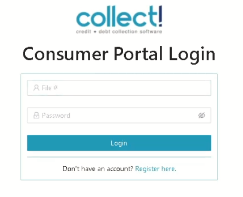
Collect! Consumer Portal ready for installation
The Collect! Consumer Portal is now available for general release. Please note that we are receiving regular feedback, so please expect regular updates to the product.
Version 1 Features:
- Is hosted on your website
- Can be branded with your logo and colors
- URL is provided to consumers via link or QR code on letters
- Asks consumers to opt-in to your communication channels
- Allows consumers to see their current balance and past payments
- Allows consumers to make a single payment
- Links to your 3rd party payment processor’s generic payment screen
- Deducts single payments from balance owing to create new balance owing
- Does not yet connect with automations related to promises or payment plans
Version 1 Enhancements Coming Soon:
- Consumer can submit new Address, Phone, and Email for Collector approval
- Statement report
- Request a call-back from Collector
Note that the portal needs to link to a 3rd party payment processor to take online payments. Ideally your payment processor has a generic payment screen that allows the consumer to enter their own payment amount. If your processor cannot provide a generic payment screen you can make use of the Collect! e-Payment Screen (CEP) for this function. In this case CEP stands between the Collect! Consumer Portal and your payment processor and provides the screen where your consumer can enter their payment amount and payment information. CEP only supports select Payment Providers. Please contact us to see if your provider is one of them.
We thank BETA users for their assistance.
Plans for Version 2:
- Ability to make payment plans
- Provide a flexible payment negotiator
Pricing:
- Cloud Users: All modules (including the portal) are included in cloud subscriptions
- Premise Users: One time module purchase of $995
- Must be on the latest version of Collect!
- Must have an active Membership
How to obtain the Collect! Consumer Portal:
- Confirm your payment processor can provide a generic payment screen
- Open a support ticket requesting installation
- Include information on your payment processor and whether they have a generic payment screen or if you will need to use CEP
- Premise sites need to:
- Make sure your Office (or server where Collect! is hosted) has a static IP as it will need to serve either the web server or API server externally
- Make sure you have access to your firewall settings
- Check your server’s hardware to ensure that it can run Apache Web Server
NY Sites with Contractual Consumer Debt

Attention sites with NY state contractual consumer debt
As part of the Consumer Credit Fairness Act (CCFA), effective April 7, 2022 New York State updated their Statute of Limitations for contractual consumer debt to 3 years from the previous 6 years.
If you have NY State contractual consumer debt, please update your statute of limitations tables to reflect this change.
ACA article on Statute of Limitations change
Statute of Limitations vary from state to state and are subject to change. ACA International’s Newsroom is an ongoing source of information affecting the ARM industry.
Check your letters
You want your consumers to call you, not us!
We have recently received a number of calls from consumers trying to reach the collection agency that sent them a letter. That means that the agency’s contact information was not put in place of our placeholder information on Collect! stock letter templates.
Please confirm that you have your contact information on your letters.
Focus on Letter Service

Letter services send more than letters
Many companies are finding their outbound letters, emails and texts managed more efficiently and cost effectively by a 3rd party letter service. These companies work with you to create your template set for various communication modes. Collect! can produce a report that outputs account data, the contact method, and the template that account data is to be inserted into. Communication results are downloaded into Collect!. Letter services will have better equipment, additional functionalities and can use their bulk rates to offer very competitive pricing.
Communication between systems is usually managed with pre-scheduled automated file uploads and downloads for minimal human involvement. While we can work with any letter service provider, our support department has experience working with the letter service partners mentioned on our Partner Page.
The ARM industry had a recent win in the US when the 11th Circuit Court of Appeals ruled against the plaintiff in the ‘Hunstein case’; more detail in the ACA article on the topic.
Quickbooks Integration Enhancement

Quickbooks Integration Enhancement
Collect! has built integrations for Quickbooks online and premise versions for the automated transfer of data from Collect! to Quickbooks to save time previously needed for manual data entry. The integration can query, modify and create records in Quickbooks with data derived from Collect! The integration includes a number of useful endpoints:
- From Collect!, you can query customers and vendors in Quickbooks and search by a range of criteria such as name or Collect! client number.
- From Collect!, you can create customers and vendors in Quickbooks with data from relevant fields in Collect! such as client number, name, address. New client data in Collect! can be automatically transferred to Quickbooks.
- In Quickbooks, you can create trust account deposits using debtor payment data from Collect!.
- In Quickbooks, you can create invoices using statement commissions data from Collect!.
- In Quickbooks, you can create bills, checks and credit memos using statement due/forwarded amount data from Collect!.
- You can combine the above features to create a complete workflow. For example, you could create a trust account deposit based on the sum of debtor payments, create an invoice based on the commission, pay the invoice from the deposited debtor funds, and transfer the remainder of the deposit as a check to your client.
- From Collect!, query completed checks in Quickbooks to return check data back to the client record in Collect!.
Most commonly, integration users save hours of data entry every month by allowing the import of all client payments from Collect! into Quickbooks. Completing this task involves having both systems open and running one report in Collect!.
User Tip
Use latest version of CBR Age Out Report
The older versions of the CBR Age Out Report will not age out an account that has an In Progress Metro Contact that was created for Credit Bureau Synchronization.
It’s a rare circumstance, but it is possible that you ran the process to setup a new Credit Bureau, but never ran the process to submit to the bureau, which would have resulted in uncompleted synchronization Contacts.
The older versions of the Age Out Report also use Listed date and Payment date for determining Age. The latest version uses just the Delinquency date. You can customize the report to meet your specific needs.
First, we recommend that you use the latest version of the Age Out Reports.
Second, we recommend that you check your database for In Progress Metro Contacts that were meant for setting up reporting to a new bureau. For more information and assistance, please contact support@staging.collect.org.
Release News
Maintenance Releases
We periodically put out maintenance releases to address reported issues.
For more information, please visit the Version 13 Revision History page here.
For more information, please visit the New Features page here.
If you are interested in upgrading, please email support@staging.collect.org.
Note:
- If you are on Collect!’s cloud solution, congratulations, you are on the latest release and will be automatically as new releases come out.
- Updating and testing in your test environment before updating your production environment is always recommended.
- If you are using Web Host, and you are running 12.2 or earlier, you will need to update your Web Host to the latest version at the same time as you update Collect!.
- You can download the new update here. It takes only a few minutes to download and install.