
In this issue:
- Logging enhancement
- Dashboard report have CSV option
- Update on inbound email capacity
- Seeking Sage Accounting betas
- Spotlight on Applied Innovation
- User conference finale
- User Tip
- Release news
Default logging enhancement

Application Log Restructured
Collect! Version 13.5.1 features a completely redesigned Application Log that now uses a database table instead of the text files previously used.
Users have the ability to set log rotation (the length of time log date will be stored before being automatically purged) for any length of time up to 8 years, with further archiving outside of Collect! an additional option.
The Application Log now contains:
- Scheduler logs
- Credit card logs
- ACH logs
- Contact plans
- Record deletions
- Import logs
Credit bureau reporting logs are not included in the Application Log for the time being, because data formatting complexities will require a different solution.
Dashboard reports now as CSV
CSV Dashboard Output Option
The latest build of the Collect! Dashboard now has the capacity to output data in CSV format, in addition to the original HTML format. Please open a support ticket to request this latest install.
This additional output option is available for all Collect! Dashboard reports, including the Spindown report. In the latest build of the Collect! Dashboard you will now see a download button when you open a report. Clicking the download button will download all the data from the report into a CSV. From there you can turn the CSV into an Excel spreadsheet, manipulate and truncate the data, and create PDFs at will.
In addition to an essential report set the dashboard provides real time activity overview for managers, clients and operators, an operator activity dashboard suitable for display and a document repository.
The Collect! Dashboard module is included with all cloud subscriptions, and is a one-time purchase for premise users.
Click Here to view the Dashboard demo.
Update on inbound email capacity

Bring emails directly into Collect!
Collect! has built a feature that will allow you to bring emails directly into Collect! rather than having them land in an email client outside of Collect! This project now ready for beta and we are seeking cloud subscribers of Collect! to be beta sites.
When ready, this enhancement will need to be installed in active applications. Going forward this enhancement will be a built-in feature of new installs.
Update on consumer portal version 1
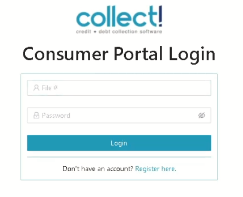
Betas using consumer portal
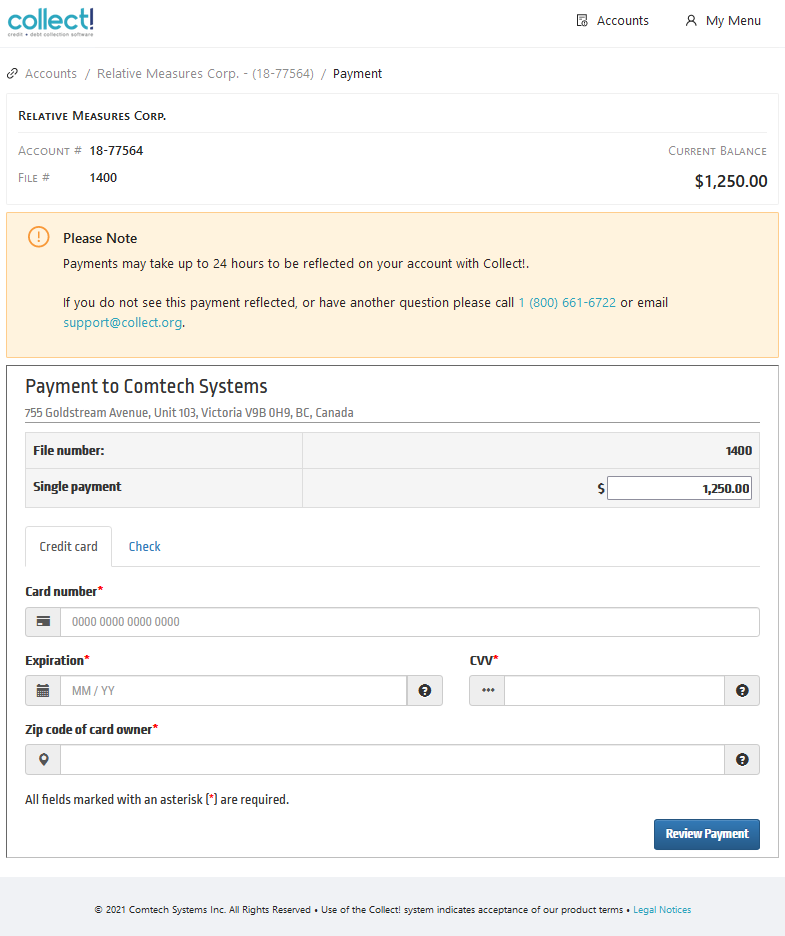
Big thanks to the agencies that are actively using the Collect! Consumer Portal Version 1 beta in conjunction with either the Collect! ePayments screen or their processor’s payment screen. As mentioned before Version 1 provides the consumer with opt-in options, provides the consumer with account and past payment information, takes single payments, and can be customized with your logo and colors.
General availability for both cloud subscribers and premise users is expected later this summer. The Collect! Consumer Portal module is included with all cloud subscriptions, and is a one-time purchase for premise users.
Later versions of the portal will offer settlement options, payment plan options and recurring payments.
A recording of the user conference Consumer Portal Demo is available in the Collect! Member Center, under Training Videos, then User Conference.
Seeking Sage Accounting betas

Save hours with automated data transfers
Numerous Collect! users save hours of data entry every month through the use of the Collect! – Quickbooks integration. Using the Quickbooks Online API, Collect! can query, modify and create records in Quickbooks with data from Collect! A second phase is underway that will allow changes recorded in Quickbooks to be automatically transferred to Collect!. This is available for Quickbooks online and premise users.
Collect! has built a parallel integration for Sage Accounting and is now ready for beta users. If you use Sage Accounting and would like these time-saving benefits and implementation attention and troubleshooting from the developer, then please reply to this email stating your interest.
Being a beta user gives you early use of a beneficial function, ongoing attention from the developer, and the possibility of influencing further feature development. Being a beta is a collaborative process – you respond promptly to the developer, and he responds promptly to you. Delayed replies stall the process.
Spotlight on Applied Innovation

Shaping the future of the ARM industry
Applied Innovation has been helping to shape the future of the accounts receivable management industry for over two decades. 2022 marks 21 years of product development driven by creative and timely resources, user feedback, agency profitability and compliant cultures. We provide two pathways: Client Connect and Consumer Connect. Client Connect includes platforms addressing robust client portal access along with document storage and management. Consumer Connect offers payment portals that facilitate express as well as full payment negotiation functionality, Regulation E focused electronic recurring payment authorizations and functions that provide for express authorization of communication preferences for email and SMS/text messaging via e-sign protocols.
Partner with a company who understands your business concerns and continually evolves to provide cutting edge technology to overcome industry challenges. Allow clients and consumers to engage with your organization using resources that enhance their experience resulting in more business and optimized revenue.
With the CFPB’s recent changes to the ARM industry compliance world with the implementation of Regulation F, now is a perfect time to assess new technologies that can take your organization to the next level. Applied Innovation has been a partner of Comtech/Collect! for many years. Schedule a meeting or demo today with a team member to discuss in further detail how our solutions can put your organization on the right path as you navigate these changing times!
User Conference summary

Conference recordings available 24/7 in Member Center
All user conference recordings will remain available to you in the Member Center in the Training Videos section.
This year 91 attendees logged on to participate in 20 sessions presented by Collect! staff and partners. We are delighted to announce that this year’s participation winners are:
- Alysia Lohner of Priority Credit Management
- Katie Smith of Durham & Durham
- Justin Grasser of Day Knight & Associates
Even though we have a booking at the Atlanta airport Embassy Suites, we will be making a final decision about whether to host a live or a virtual early in 2023. As always, your opinion matters!
Virtual events have the advantage of no travel, sessions are recorded, sound is better, everyone can see screens up-close, we can offer a wider range of presenters, and overall great value for the resources required. In contrast Live events involve a change of scene, foster inter-personal connections between users and with Collect! staff and encourage ad hoc learning.
Please take 2 minutes to tell us your preference of live vs virtual via Survey Monkey.
User Tip
Collect! 13.5 contains programming for new CBR rules
Collect! Version 13.5, released June 20, implemented the credit bureau reporting rules for Medical reporting that came into effect July 1, 2022 for Delay Days and will come into effect March 1, 2023 for Minimum Balances.
- Minimum days to report.
- Minimum balance to report (March, 2023).
- Converted the “From date” radio buttons to a pick list called “Delay from” on the Client Settings Form.
- Added “Min value of” and “Min Balance” to the Client Settings form.
- When you change the Delay Days field or Min Balance field on the Client Settings form, you will be prompted to run a query. If you select yes, the system will update the Metro Contacts accordingly.
- For any that are set to DA during this process, the system will flag the Debtor with a special Reactivate flag. The next CBR run after the DA has been submitted to the bureau will invoke the reactivation process, which will set the account as a new report with the TT1 code and the remaining fields on the CBR tab will be set based on the last Metro Contact before the account was deleted.
- Added a switch to the Credit Bureau Setup form called “Exclude log warning” which, when enabled, will exclude any Info and Warning messages from the CBR log where the accounts were still sent.
- Clearing the Validation Date and CBR Hold Dates will now log to notes, if the log to notes box is enabled on those fields.
- Added an “Accounts to report” pick list on the Report to Credit Bureau form with the options for All (default), Consumer, and Commercial. If All is selected, the legacy behavior will occur where all accounts are run to a single Metro2 file. If Consumer is selected, then only accounts where the Legal Entity is 0 (not set) or greater than 99 will be processed and outputted to a file post-fixed with _CON in the filename. If Commercial is selected, then only accounts where the Legal Entity is between 1 and 99 will be processed and outputted to a file post-fixed with _COM in the filename.
- When an account is setup to report to the Credit Bureau, if the Legal Entity field is set to a Commercial value, then the ECOA code for the Debtor and New Cosigners will be set to W (Commercial).
Release News
13.5 released
- Credit Bureau Reporting changes listed above under User Tip.
- Redesigned the Application Log to use a database table instead of text files. Merged the Scheduler, Credit Card, and ACH logs into the Application Log.
- WIP Options: Relabeled OK and Cancel as Save System and Don’t Save. Relabeled Save as Default to Save Operator. Save System will update the global settings for Operators that do not have a custom configuration file. Don’t Save will close the form without saving. Save Operator will create or update the custom configuration file for the selected Operator.
- Auto Dialer Preferences: Relabeled OK and Cancel as Save System and Don’t Save. Added Save Operator. Save System will update the global settings for Operators that do not have a custom configuration file. Don’t Save will close the form without saving. Save Operator will create or update the custom configuration file for the selected Operator.
- Added the ability to search by Invoice and Receipt/Check numbers on Debtor Transactions and Client Invoices.
- Added “Website” to the Company Details form.
- Running a Contact Plan or Report will now record the Last Run date and time on the record.
- Added “Last Login” to Operator form, which populates when logging in to desktop or web host application.
- Updated the Batch Recalc to exclude Closed accounts rather than include Active ones. This will allow recalc to run on Suspended and Pre-collect accounts.
- Converted Letter Number on the Report Options form to an alphanumeric string field.
- Disabled pop up prompt asking for ID and Password every time a level 1, 10, or 99 made a payment.
- ACH payments will now adjust the final payment to the remaining Debtor or Group owing if the owing gets lower than the payment amount when setting up the post-dated transactions.
For more information, please visit the New Features Page here.
If you are interested in upgrading, please email support@staging.collect.org.
Note:
- If you are on Collect!’s cloud solution, congratulations, you are on the latest release and will be upgraded automatically as new releases come out.
- Updating and testing in your test environment before updating your production environment is always recommended.
- If you are using Web Host, and you are running 12.2 or earlier, you will need to update your Web Host to the latest version at the same time as you update Collect!.
- You can download the new update here. It takes only a few minutes to download and install.